News
Gemini Overlay Makes Pixel Watch Feel Like One Continuous Assistant
Google’s new Neural Expressive Gemini overlay lands on Pixel Watch, matching phones and setting up later 2026 Intelligence features for wrist automation.

Google is rolling out a new Gemini overlay on Wear OS that sits directly over the current watch face instead of launching the full app. The change, live for some Pixel Watch owners via version 1.36, copies the Neural Expressive look already on phones and tablets.
The update is server-side gated, so the app may already be installed while the new visuals arrive later. Functionality stays the same; the goal is visual and interaction consistency across Google’s screens.
That split between client and flag matters for anyone watching the Play Store version number. Installing 1.36 only prepares the device. The expressive layer still waits on Google’s servers before it appears on the wrist.
The Overlay That Stays on Your Watch Face
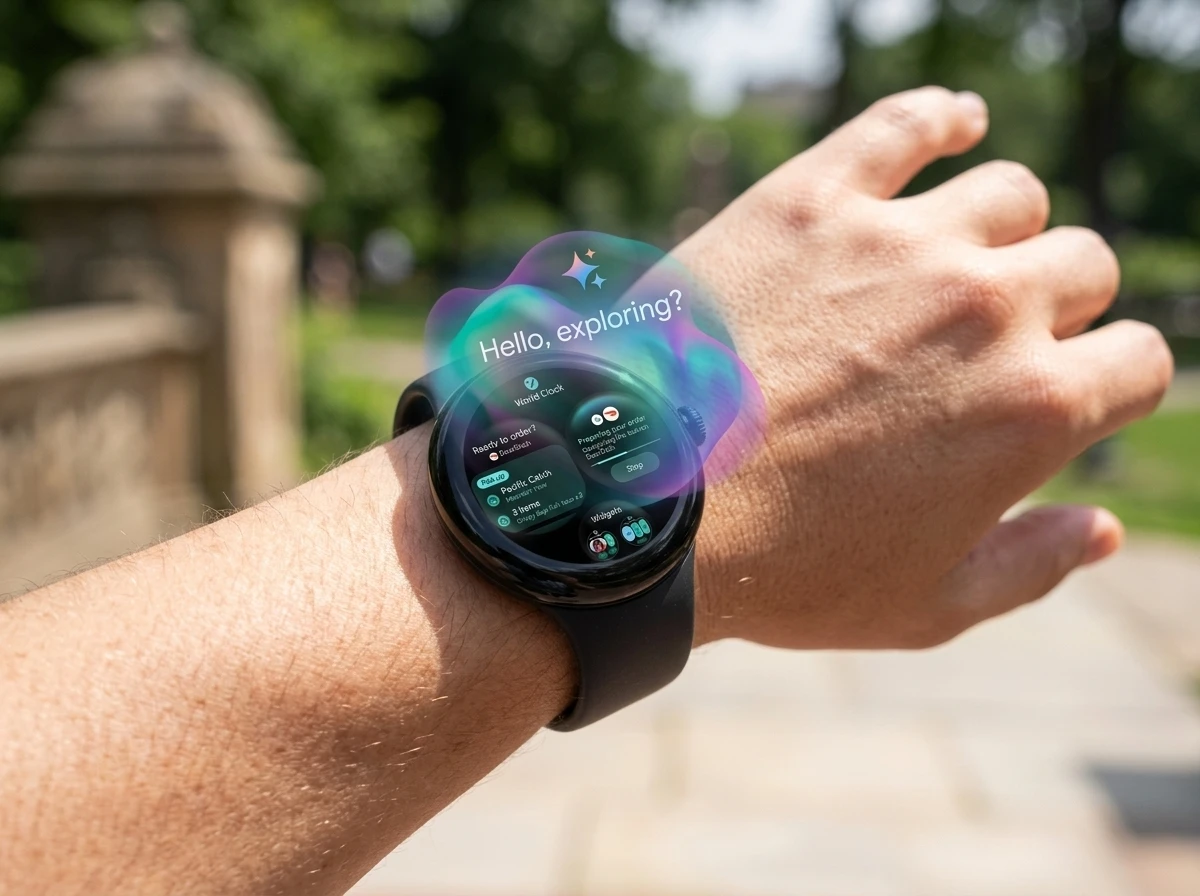
Activating Gemini used to take over the entire display. Now the assistant appears as a lightweight layer on top of whatever face you already have running. You keep context. You see the spark icon, a short greeting, and the familiar fluid background.
Play Store screenshots show a live transcript of the spoken prompt plus confirmation once an action finishes. The system microphone privacy indicator has moved from the bottom edge to the top. The full Gemini app on Wear OS received the same visual pass, so the experience matches whether you stay in the overlay or open the deeper interface.
- Overlay sits above the active watch face rather than replacing it
- Neural Expressive background, spark icon and greeting appear immediately
- Transcript of the prompt and action confirmations display in real time
- Microphone privacy indicator relocated to the top of the screen
Users on Pixel Watch 4 and even some Pixel Watch 3 units have already received the look. Others still wait on the server flag.
Keeping the watch face visible changes the feel of a quick query. A glance still shows the time, complications, or activity rings beneath the translucent layer. The assistant no longer forces a hard cut away from the face you chose. That small retention of context is the practical core of the redesign on a round display.
Because the full app received the identical visual pass, moving from overlay to deeper tools never produces a jarring style break. The spark, the fluid motion, and the typography stay constant. Users who only ever use the overlay and users who open the full interface now share one visual language.
Neural Expressive Comes to the Wrist
The design language arrived on phones, tablets and web in May. Google described it as a full rethink built for the AI era.
We’ve redesigned the entire Gemini experience from the ground up, introducing a stunning new design language we call Neural Expressive. The interface now features fluid animations, vibrant colors, new typography and haptic feedback.
Josh Woodward, VP of Google Labs, Gemini app and AI Studio, wrote those lines when the phone rollout began. The same vocabulary now reaches the smaller round display. Cross-device consistency means the assistant no longer feels like three separate products stitched together. A query started on the watch looks and behaves like one started on the phone.
The redesign was first shown in May and appeared on the Samsung Galaxy Watch 9 ahead of the wider Wear OS push. That early Samsung sighting fits the pattern of Google testing interface changes on partner hardware before Pixel devices.
On a watch the same ingredients compress. Fluid animations must remain light enough for a small battery. Vibrant colors have to stay legible against varied watch faces. Typography must work at a glance. The wrist version therefore inherits the identity without copying every phone flourish at full scale. The goal is recognition, not pixel-for-pixel duplication.
Haptic feedback mentioned in the original phone description also finds a natural home here. A short confirmation tap on the wrist can replace a longer on-screen message when the user is moving. The redesign was built with that kind of multi-surface use in mind from the start.
Wear OS 7 Already Set the Stage
Wear OS 7 began reaching eligible Pixel Watch 2, 3 and 4 units in mid-June. It delivered Live Updates, better media routing, gesture refinements and up to 10 percent battery gains for average users. Raise to Talk became more reliable. Gemini Intelligence was explicitly left for a later update.
| Aspect | Before Overlay | With New Overlay |
|---|---|---|
| Activation result | Full Gemini app takes over screen | Lightweight layer over current face |
| Visual language | Older Wear OS Gemini UI | Neural Expressive matching phones |
| Transcript and confirmations | Limited or separate | Shown live in overlay |
| Mic privacy indicator | Bottom of screen | Top of screen |
| Full app consistency | Divergent look | Same visual updates applied |
The overlay arrives after that foundation. It does not require a brand-new OS version; it rides on the existing Wear OS 7 base plus the 1.36 client update. That sequencing keeps the change light while the heavier Intelligence features wait for more hardware and software readiness.
Raise to Talk reliability gains from mid-June now pair directly with the new layer. The gesture that once opened a heavier full-screen experience can summon a thinner one. Battery improvements of up to 10 percent give the system more headroom for the animations and live transcript rendering without undoing the efficiency work already shipped.
Live Updates and improved media routing also benefit. When the overlay appears over an active face, those system surfaces remain conceptually nearby rather than buried under a full app takeover. The OS and the assistant start to feel like coordinated layers instead of competing full-screen modes.
Pixel Watch Owners Start Seeing It
Version 1.36 of the Google Gemini on Wear OS app listing has been widely available through the Play Store. The new look itself is controlled server-side and is not yet universal. Some owners reported the interface two days before the public write-ups; others still see the older full-app launch.
50M+ downloads sit on the Wear OS Gemini listing. The app was last updated around August 4. Ratings hover near 3.2-4.0 depending on the snapshot, with common notes about reliability when servers lag and praise for quick timers, messages and notes.
- Client version: 1.36 widely rolled out
- Visual flag: server-side, staggered
- Devices reporting it: Pixel Watch 4 and some Pixel Watch 3
- Preview history: May demos and Galaxy Watch 9
The staggered nature matches how Google often ships assistant visuals. Early adopters on the latest Pixel hardware get first access; the rest follow as capacity allows. Galaxy Watch users on compatible One UI Watch builds have also spotted the same overlay in community posts.
The download count and the modest rating range together sketch a mature but imperfect service. People already rely on it for short tasks. Visual polish does not fix server lag, yet it can make successful interactions feel more finished. That distinction helps explain why the flag is rolling slowly: the client is ready, but the experience still depends on backend health.
From Full App to Continuous Layer
The practical difference is interruption cost. A runner or cyclist who raises a wrist no longer loses the current face or has to dismiss a full-screen app. The overlay keeps the conversation short and glanceable. Transcripts turn spoken input into readable text that can be checked without ending the session. Action confirmations close the loop without forcing a switch to another screen.
That continuity matters more than any single animation. When the same assistant identity appears on phone, tablet and watch, muscle memory transfers. Users stop treating the watch as a limited sidekick and start treating it as another node of the same helper. Crowd discussion on X and Reddit already frames the change as the moment Gemini on the wrist “feels finished” rather than provisional, even though the underlying model answers have not changed.
The move also aligns with Raise to Talk improvements that arrived with Wear OS 7. Lift the wrist, speak, and the overlay appears without a button press. The combination lowers friction further.
Short sessions benefit most. Setting a timer, sending a quick message, or saving a parking note fits the glanceable format. Longer multi-turn work can still move into the full app, which now shares the same look. The overlay therefore acts as the default front door rather than a permanent ceiling on capability.
The Rollout Follows a Clear Sequence
The pieces did not arrive together. They stacked in a deliberate order that kept each step small enough to ship on existing hardware and software.
- May: Neural Expressive design language launches on phones, tablets and web; early demos appear
- Galaxy Watch 9 preview: the new look surfaces on partner hardware ahead of the wider Wear OS push
- Mid-June: Wear OS 7 reaches Pixel Watch 2, 3 and 4 with Raise to Talk gains and battery improvements
- Around August 4: Gemini on Wear OS client updates to version 1.36
- Server flag wave: Neural Expressive overlay begins reaching Pixel Watch 4 and some Pixel Watch 3 units
- Later this year: Gemini Intelligence features planned for select Wear OS 7 devices
Each stage prepared the next. The design language had time to settle on larger screens first. Wear OS 7 hardened the gesture and power foundation. The 1.36 client landed the code. Only then did the visual flag begin to flip. Intelligence can now arrive without also carrying a sudden redesign.
Partner hardware served as an early signal. Seeing the look on the Galaxy Watch 9 before the broad Wear OS push told observers the direction was fixed. Pixel owners simply waited for the same server-side gate to open on their devices.
What Gemini Intelligence Adds Later
Google has been clear that the heavier capabilities sit behind a second wave. Select Wear OS 7 devices will receive Gemini Intelligence features later this year. Those include Create My Widget for natural-language custom dashboards, multi-step app automation that can reserve a bike or place a regular order, and Personal Intelligence that pulls context from Gmail, Search and chat history.
The Neural Expressive design language for Gemini was always meant to power that more agentic layer. By landing the visuals first, Google removes the jarring switch that would otherwise occur when automation features arrive. The wrist already looks like the rest of the Gemini family; the new skills simply plug in.
Hardware still matters. On-device processing for the richest features favors newer silicon. The Pixel Watch 5 hardware path for on-device AI and the Galaxy Watch 9 chip and Gemini support both point toward chips better suited to local inference. The overlay works on current devices; the full Intelligence suite will likely concentrate on the strongest hardware first.
Create My Widget and multi-step automation both assume a stable visual shell. A user who builds a custom dashboard with natural language should not meet an older interface when the widget appears. Personal Intelligence that draws on Gmail, Search and chat history likewise benefits from looking like the same Gemini the user already trusts on the phone. Shipping the shell ahead of the skills avoids a second, more disruptive transition later.
Why Consistency Matters for Daily Use
Visual parity across phone, tablet and watch is more than branding. It reduces the mental tax of switching surfaces. A person who learns the spark icon and fluid background on a phone already knows what the wrist layer means. No second tutorial is required.
The same logic applies to confirmation patterns. Live transcripts and action confirmations that mirror the phone teach users they can trust the watch for the same class of short tasks. Ratings that already praise timers, messages and notes suggest those tasks are the daily core. Matching the look reinforces that the watch is a valid place to do them.
- Shared spark icon and greeting lower recognition time
- Matching transcripts make spoken input checkable on any screen
- Identical full-app visuals remove style breaks when sessions deepen
- Raise to Talk plus overlay keeps activation hands-light
Server-side gating, while frustrating for those still waiting, also protects consistency. Turning the flag on only when the backend can support the polished path avoids a wave of half-broken first impressions. The 50M+ download base is large enough that a messy debut would echo quickly in ratings already sitting in the 3.2-4.0 band.
The Wrist Becomes the Always-On Node
A small overlay does not rewrite battery math or invent new sensors. It does change the default posture of the assistant. Gemini no longer feels like an app you open; it feels like a layer you summon. That shift is what makes the later automation promises usable in daily life rather than demo videos.
Pixel Watch owners who already have the update can test the difference on ordinary queries: timers, messages, parking notes, playlist requests. The rest will see the same visuals as the server flag expands. When multi-step actions and custom widgets land, the interface will already match the phones people carry. The watch stops being a separate product and becomes the always-on edge of one continuous Gemini surface.
Until the Intelligence wave arrives, the overlay still earns its place. It trims interruption cost, aligns muscle memory across devices, and finishes a visual story that began in May. The heavier skills will matter more when they land. The light layer makes sure they land on ground that already feels like home.

NFL Three-Strike Safety Fouls Now Pull Coaches and Clubs In

Browns Fans Tape Protest Signs to Jim Brown Statue Over Watson

Amazon Pixel 11 Deal Erases the $100 Hike for One More Day

Elden Ring on Switch 2 Turns Its Own Worst Label Into a Portable Win

Ternus Takes the Stage With Apple’s Foldable Debut

Ikea Xbox Yxstaby Turns Controller Thumbstick Into Home Furniture

Pokémon Center Turns Past Worlds Wins Into Bundles and a Pikachu Coin

NFL Scraps Pro Bowl Game to Restore Pure Player Honor

New Twitter.now Bets the Brand Musk Left Behind

Bella Mir’s Famous First Loss Meets the Accountant Who Won

Double Fine Cuts 23 Jobs Weeks After Xbox Independence

Day-One Big Walk Lifts PS Plus August Beyond Recycled AAA

John Hight Exits Wizards After Digital Reckoning Hits

Curtis Mead’s Red Sox Debut Ends With Fractured Wrist

Moesch and Dressel Rewrite Night One at 2026 U.S. Nationals

Red Sox Squander Hot Streak Chance in 4-3 Loss to Athletics

Boutte’s Quiet Camp Takeover Forces Patriots Receiver Choices

Take-Two CEO Pushes Netflix Subs for GTA 6 Extended Look

Halo Campaign Evolved Skulls Meet Death Barriers That Kill the Hunt

Wildlands Free Update Hands Players the Tools They Already Invented
-

 TECHNOLOGY3 years ago
How to Adjust a Bulova Watch Band – An Easy Guide
-

 News3 years ago
Fred Pentland: Athletic Bilbao’s English mentor who changed the essence of Spanish football
-

 FINANCE3 years ago
Tax Planning for Every Season: Guide to Maximizing Your Tax Benefits
-

 Education3 years ago
African Ministers New Education Plan
-
 BUSINESS3 years ago
What is Entrepreneurial Operating System? A Comprehensive Guide to EOS
-

 Education3 years ago
Innovate Your Learning Journey with Technology and Enhance Education
-

 News3 years ago
Russians formally out of World Athletics Championships
-

 BUSINESS3 years ago
Top 9 Most Expensive American Cities to Rent an Apartment