
News
Siri in iOS 27: Every New Feature and the Google Gemini Catch
Siri in iOS 27 gains personal context, onscreen awareness and a chatbot mode, all running on a custom Google Gemini model. Here is what changes and when.

Apple’s long-promised smarter Siri in iOS 27 finally arrives this year, and it shows up running on a rival’s brain. The assistant Apple first teased at its 2024 developer conference now leans on a custom Google Gemini model, picking up personal context, onscreen awareness, deeper control inside apps and a full chatbot mode, with the first public look due at the company’s keynote on June 8.
That is the part Apple would rather you skip past. The version it demonstrated two years ago was meant to run on Apple’s own architecture, and it didn’t work well enough to ship. So Apple is paying Google a reported $1 billion a year to borrow the model that does.
Why the New Siri Took Two Years and a Google Check
Apple showed off a reworked Siri in June 2024 and slotted it for iOS 18. The underlying system wasn’t reliable, the launch slipped, and the feature became the most public stumble of Apple’s AI push. The rebuild is what reaches users in iOS 27.
The fix came from outside. On January 12, 2026, Apple and Google confirmed a multi-year deal under which Google’s models feed the next generation of Apple Foundation Models, the in-house system behind Apple Intelligence. The agreement gives Apple a custom 1.2-trillion-parameter Gemini model built for Siri, roughly eight times the size of the 150-billion-parameter cloud model Apple had been running. Apple looked at OpenAI and Anthropic first, then went with Google.
The next generation of Apple Foundation Models will be based on Google’s Gemini models and cloud technology, powering future Apple Intelligence features, including a more personalized Siri coming this year.
That line comes from the joint statement from Google and Apple, the closest thing to a primary source on a deal both sides have kept light on numbers. Gene Munster, managing partner at Deepwater Asset Management, has put the full value at up to about $5 billion over the term.
- $1 billion a year is the reported annual fee Apple pays Google for the Siri model.
- 1.2 trillion parameters sit inside the custom Gemini build, eight times Apple’s prior cloud model.
- January 12, 2026 is when both companies confirmed the partnership.
The stakes reach past your phone. Apple’s Siri reboot puts Google’s Gemini inside roughly 2.5 billion active devices, and unreleased hardware is waiting on it too. New Apple TV and HomePod mini units are finished and in use inside Apple’s offices, yet they are stuck behind the new Siri until it ships.
What Siri Can Finally Do in iOS 27
The headline features are the three Apple demoed in 2024, now joined by extra abilities the company has built since. They share one idea: Siri stops being a voice that fetches facts and starts acting on your data and your screen.
Personal Context
With personal context, Siri reaches into your emails, messages, files and photos to answer questions about your own life. Apple’s examples are plain: show me the files Eric sent me last week, find the email where Eric mentioned ice skating, where’s the recipe Eric sent me, what’s my passport number. The assistant tracks what you have been sent and surfaces it on request, which is the kind of memory iPhone owners have watched Android users get from Gemini’s tie-in with Google services.
Onscreen Awareness
Onscreen awareness lets Siri read whatever is in front of you and act on it. Get a text with an address, and you can tell Siri to drop it onto that person’s contact card. Looking at a photo, you can ask Siri to send it to someone without leaving the screen. The assistant works from context instead of needing every detail spelled out.
App Actions Across Apple and Beyond
The third piece is doing things inside apps. Siri will move a file from one app to another, edit a photo and share it, pull up directions home and text your ETA, or draft an email and send it. Apple is opening this to outside developers, who can expose their apps’ actions to Siri, so the reach is meant to grow past Apple’s own software over time.
Siri Becomes a Chatbot You Can Talk Back To
Apple is turning Siri into a true conversational chatbot, the kind you can argue with the way you would with ChatGPT or Claude. It lives at the system level across Apple’s operating systems, and there is a dedicated Siri app for longer back-and-forth sessions. Siri can search the web and summarize, read and digest documents you upload, and generate images and writing.
What separates it is access. A standard chatbot can’t open your Mail, read your Notes, or see your Photos library. Siri can, and it can hold a thread, remember earlier questions, and answer multi-part requests without losing the plot.
| Capability | New Siri (iOS 27) | ChatGPT / Claude |
|---|---|---|
| Web search and summaries | Yes | Yes |
| Read your Mail, Photos, Messages | Yes | No |
| System-level device actions | Yes | No |
| Image and content generation | Yes | Yes |
| Underlying model | Custom Google Gemini | Their own models |
The trade-off is obvious in that last row. The chatbot that knows the most about you is the one trained on a model Apple rents from its biggest search rival.
The Dynamic Island Is Siri’s New Home
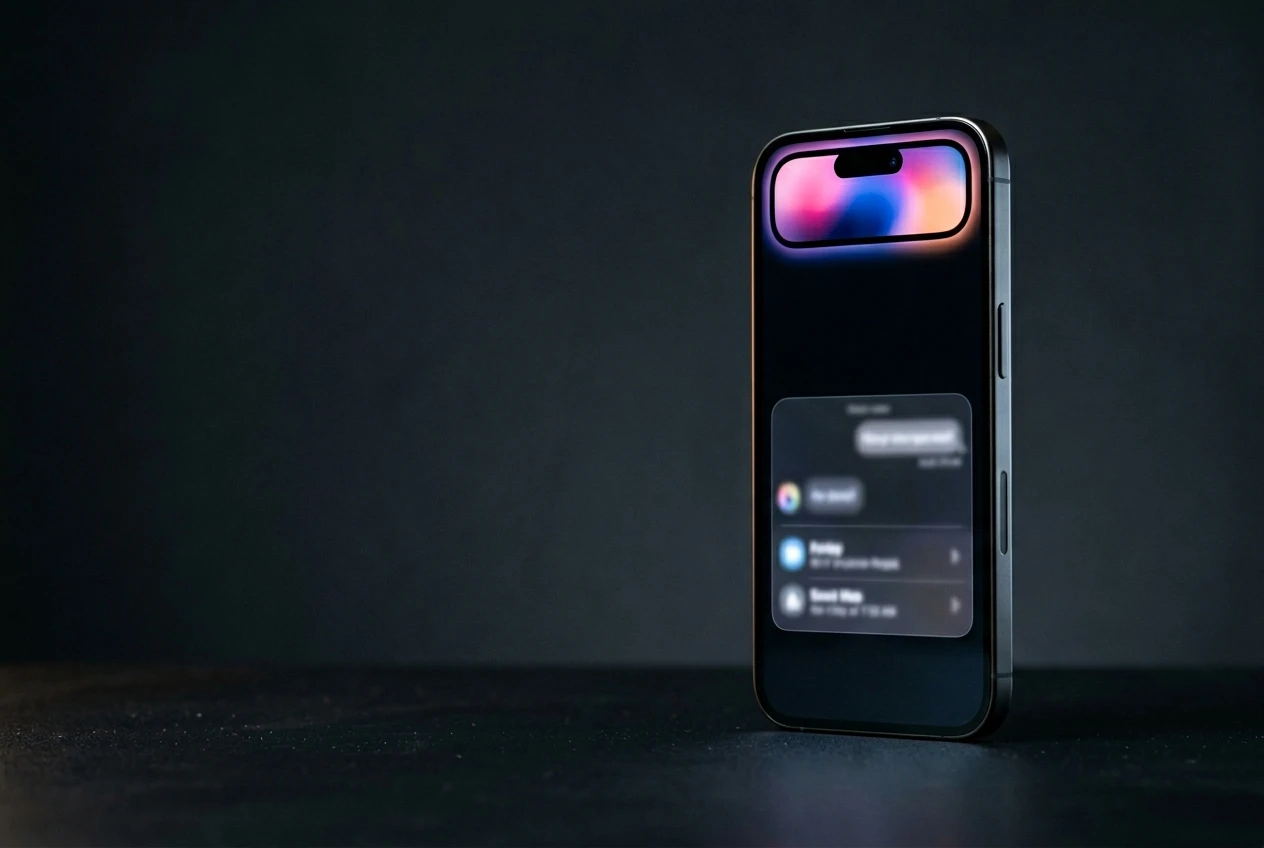
The redesign moves Siri into the Dynamic Island, the pill-shaped cutout at the top of recent iPhones. Swipe down from the center of the Home Screen or any app and a Search or Ask field appears there. A glowing, pill-shaped animation signals that Siri is thinking. When it has an answer, the island expands into a transparent card carrying the result, with images, web info and notes folded in.
Swipe on that card and you drop into a conversation view that looks like an iMessage thread, with an exit into the full Siri app. Search or Ask replaces the old Siri Suggestions, and it handles more than questions.
- Launch apps and start text messages
- Check weather and add calendar events
- Trigger in-app shortcuts and run Apple’s new AI web search
- Hand a query off to a third-party chatbot instead of Siri
The gesture shuffle has knock-on effects. With the center swipe taken, Notification Center moves to a swipe down on the left of the display, while Control Center stays on the right. “Hey Siri” and the Side button still wake the assistant. The new interface is dark only, with no light mode, using color accents that echo the pink, blue, purple and orange of Apple’s keynote artwork.
Privacy Limits and the Rivals Apple Is Letting In
Apple is selling privacy as the reason to trust a Siri that now knows this much. It plans to keep as much processing as possible on the device, with heavier work going to Private Cloud Compute, the server setup Apple says runs Apple Intelligence without exposing your data. There are caps on what Siri’s memory can hold and how long it persists.
Users get a control over history too. You can auto-delete Siri chats and requests after 30 days or one year, or keep them forever. Siri and Apple Intelligence can still be switched off entirely, so anyone who wants none of this can opt out.
The bigger surprise is who Apple invites in. Through new Extensions settings on iOS 27, iPadOS 27 and macOS 27, you can route questions to Claude, Gemini or ChatGPT instead of Siri, picked from a dedicated Extensions section in the App Store. Those services can also become the default for Apple Intelligence tools like Writing Tools and Image Playground, and you can swap in a third-party voice, so a reply from your chosen chatbot sounds different from a reply from Siri.
Which iPhones Get It, and When
Apple Intelligence needs an iPhone 15 Pro or later, and the new Siri options are expected to carry the same floor, which leaves older iPhones out. The hardware bar is the same one Apple set when it first launched Apple Intelligence, detailed on its Apple Intelligence feature page.
The calendar runs in three steps:
- June 8: Apple previews the new Siri at the WWDC keynote, with developer betas of iOS 27, iPadOS 27 and macOS 27 the same day.
- July: public betas open up.
- September: the finished updates ship to everyone.
One caveat worth holding onto. Apple has not said every new Siri feature will be live in the betas, or even ready the day iOS 27 ships, so some pieces could trickle out after launch. The keynote runs at 10 a.m. Pacific to open a conference that stretches through June 12, with the full agenda on Apple’s WWDC 2026 developer schedule. After a two-year wait, the date that matters is September, when the Siri Apple promised in 2024 lands on phones that can run it.
Frequently Asked Questions
When will the new Siri in iOS 27 be released?
Apple previews the new Siri at its WWDC keynote on June 8, with developer betas the same day and public betas in July. The finished software, including iOS 27, ships in September. Not every feature is guaranteed to be ready at launch.
Which iPhones support the new Siri?
You need an iPhone 15 Pro or later, the same hardware requirement Apple set for Apple Intelligence. Older iPhones are expected to miss the new Siri features even after updating to iOS 27.
Does the new Siri run on Google Gemini?
Yes. Apple is paying Google a reported $1 billion a year for a custom 1.2-trillion-parameter Gemini model that powers the rebuilt Siri and other Apple Intelligence features, under a multi-year deal confirmed on January 12, 2026.
Can I use ChatGPT or Claude instead of Siri?
Yes. New Extensions settings let you route questions to ChatGPT, Claude or Gemini, and you can set them as the default for Apple Intelligence tools like Writing Tools and Image Playground, with a separate Extensions section in the App Store for picking one.
Is the new Siri private if it knows my emails and photos?
Apple keeps as much processing as possible on the device and sends heavier work to Private Cloud Compute. You can auto-delete Siri chats after 30 days or one year, keep them permanently, or turn Siri and Apple Intelligence off completely.
Will there be a separate Siri app?
Yes. iOS 27 adds a dedicated Siri app for longer text and voice conversations, with a list or grid of past chats you can favorite, search and save, styled like an iMessage thread with chat bubbles.






Halo Campaign Evolved Skulls Meet Death Barriers That Kill the Hunt

Spotify Running Mode Returns After the 2015 Experiment Failed

Amazon AWS Hits Fastest Growth in Years as AI Spend Pays Off

Amazon Bets Platform Beats Models in the AI Race

Apple C2 Modem Edges Into iPhone 18 Pro After Qualcomm Drop

Google Earth Adds Nano Banana 2 to Reimagine Real Places

Apple Upgrade Turns Phones Into Monthly Utility Bills

Asha Sharma Bets Xbox Growth on Console and Four C’s

MacBook Ultra Design Follows Apple’s Familiar Cascade Path

TAG Heuer Carrera x Team Ikuzawa Revives 1970s Roadmaster Stopwatch DNA

Pokémon GO Developer Niantic Rebrands as Scopely Explore

Jaylen Brown Traded to 76ers for Paul George and Four Draft Picks

Doom Studio id Software Cuts Half Its Staff in Xbox Layoffs

Nintendo Switch Online Adds Four Classics and One Japan-Only Title

Jordan Henderson Hospitalized After Wrist Injury at the Azteca

Mexico’s World Cup Run Ends at Azteca as England Hold On 3-2

Meta’s Muse Image Lets Anyone Use Your Instagram Photos in AI

Louis Vuitton Beats Molly Tea in China, Triggers Cultural Backlash

Pink Bearista Cup Returns July 13 as Starbucks Pink Vibes Drops

Samsung Sets Galaxy Unpacked for July 22 in London With a Wider Fold
-

 TECHNOLOGY3 years ago
How to Adjust a Bulova Watch Band – An Easy Guide
-

 News3 years ago
Fred Pentland: Athletic Bilbao’s English mentor who changed the essence of Spanish football
-

 FINANCE3 years ago
Tax Planning for Every Season: Guide to Maximizing Your Tax Benefits
-

 Education3 years ago
African Ministers New Education Plan
-
 BUSINESS3 years ago
What is Entrepreneurial Operating System? A Comprehensive Guide to EOS
-

 Education3 years ago
Innovate Your Learning Journey with Technology and Enhance Education
-

 News3 years ago
Russians formally out of World Athletics Championships
-

 BUSINESS3 years ago
Top 9 Most Expensive American Cities to Rent an Apartment