
News
AMD’s $4,000 Ryzen AI Halo Boots Local AI in 9 Minutes and 38 Seconds
AMD’s $3,999 Ryzen AI Halo boots a local AI model in 9 minutes and 38 seconds, undercutting Nvidia’s DGX on setup while trailing on cluster bandwidth.

AMD’s Ryzen AI Halo Developer Desktop brings a fresh local AI model online 9 minutes and 38 seconds after the first power-on, a stopwatch reading the PCMag first-look tester called the fastest local-AI cold boot he had run. The $3,999.99 box ships with LM Studio, ComfyUI, and the AMD Ryzen AI Developer Center preloaded, so a developer skips the dependency and model-file wrangling that has defined earlier local-AI builds. Inside the cobalt chassis sits a Ryzen AI Max+ 395 processor, 16 Zen 5 cores, 40 RDNA 3.5 graphics compute units, and 128 GB of unified memory. The Halo goes head-to-head with Nvidia’s DGX Spark, the Linux-default incumbent that AMD has been public about challenging, on price, OS, and the size of its cluster ceiling.
The first round of testing did not deliver head-to-head Nvidia numbers, leaving direct cluster benchmarks for a follow-up. The first-look review running the 9:38 setup-time test covers the cobalt chassis, the rear I/O, the 10Gbps cluster port, and a ComfyUI playbook run that hit a real snag halfway through. This piece walks through what is on the testbench, where the Halo lands against Nvidia’s compact AI desktop, and what the next round of local-AI testing still has to settle.
The 9 Minutes and 38 Seconds First Response
That 9:38 reading came from a stopwatch started the moment the tester pressed the power button and stopped when the first text reply to a ‘Hello!’ prompt came back in a fresh LM Studio window. The chosen model was Google’s Gemma-4-E4B, a 6.33 GB download that AMD’s first-run flow recommends as a starter. Windows 11 was already past its out-of-box experience screens, Wi-Fi was on, and a Bluetooth keyboard and mouse pair was registered, so the timer did not cover those one-time steps. The same tester had run comparable setups on high-end gaming laptops and on the Nvidia DGX Spark, and called this one the smoothest of the three.
On those other rigs, his routine starts with manually downloading software dependencies, configuring the environment, installing the front end, and tracking down a compatible model format. Building that stack from a blank system can involve 30 to 40 minutes of troubleshooting terminal errors before the first response, he wrote. AMD’s developer-center hub strips most of that routine away by pre-staging the binaries and the launcher icons before the box ever powers on. The Halo can also be ordered with a Linux image at the same $3,999.99 price, where the same preinstalls ship packaged for the AMD ROCm stack instead of Windows. Against Nvidia’s Linux-default DGX Spark, AMD’s pitch is one of minutes saved on day one.
A Cobalt Chassis Built for the Desk
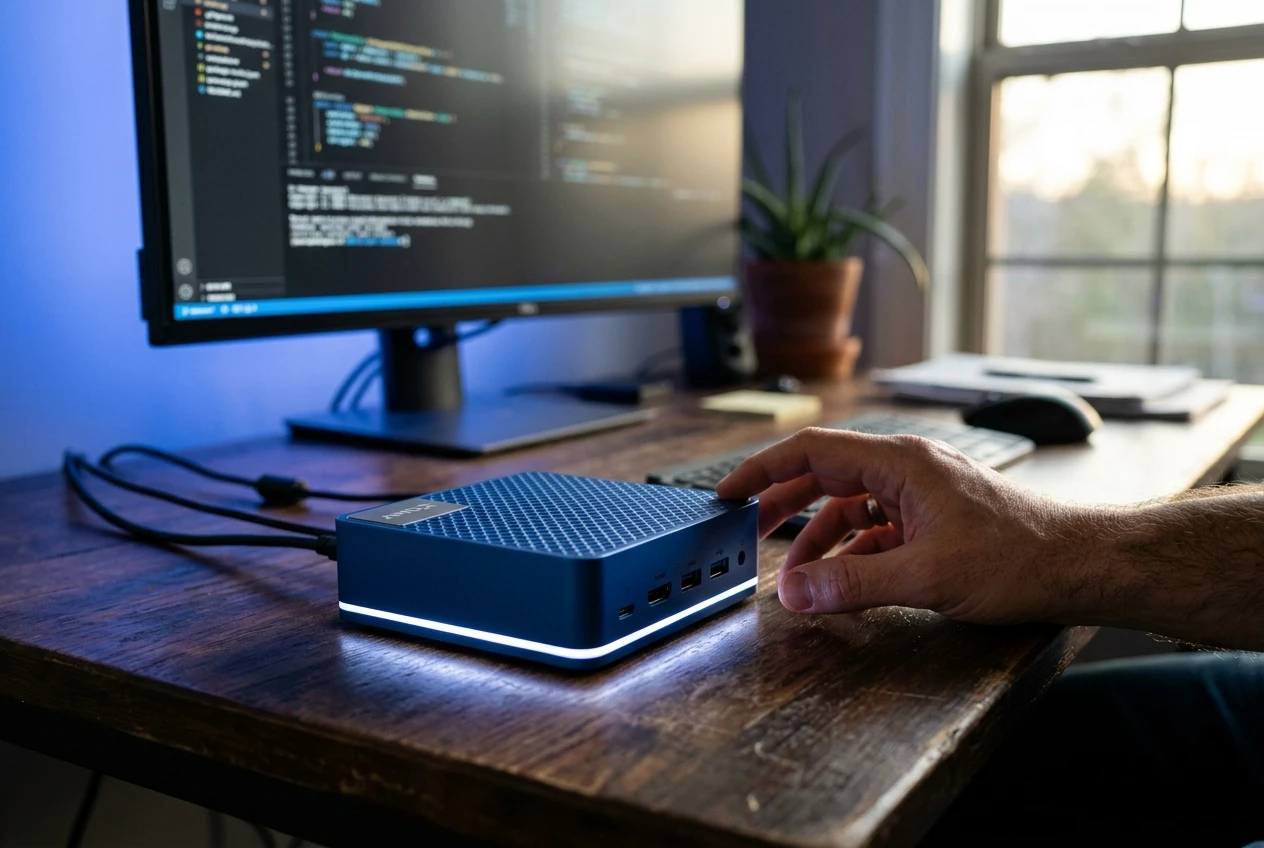
The Halo is a 5.9-inch square mini PC about 1.8 inches thick, weighing 2.7 pounds, sized to share desk space with a monitor and a laptop. Its cobalt finish uses a pearlescent sheen that shifts under light, a deliberate break from the matte aluminum look most mini PCs wear. A textured diamond grid pattern covers the top and sides and acts as the chassis ventilation, replacing the usual grille cutouts. The whole unit feels built to sit flat on a hard surface and stay there.
An LED status bar runs around the base, lighting subtle AMD logos cut into the front and top panels. White means on, a slow blue pulse means standby, and red flags a DRAM fault. A fast white blink points to a power-rail problem, and a slower blue flash calls out fan trouble, useful diagnostics from a box with no front display.
That airflow design forces a single orientation. Cool air pulls in through the front, sides, and top, and exhaust blows straight out the back, so the box must sit horizontal on a hard surface. Side mounting and vertical desk stands are out, because each orientation would block one of the intake paths. The chassis fans stay quiet when idle but ramp up under load, moving enough air to be audible from across a small room.
Inside, the chip is rated for 126 trillion AI operations per second (TOPS), a figure AMD publishes on its product page without a workload footnote. The Ryzen AI Max+ 395 pairs those 16 Zen 5 cores with 40 RDNA 3.5 graphics compute units. Together with 128 GB of unified memory, AMD’s Halo product page with full specs says the box is good for up to 200-billion-parameter models running locally.
Connectivity, With One Cluster-Sized Caveat
The rear I/O panel sits below the heat exhaust and carries a single 10Gbps RJ-45 Ethernet jack, a full-size HDMI 2.1 output, and four USB-C ports. Each USB-C has a different job. One powers the desktop, another drives an external monitor, and the remaining two serve as USB4 hubs for high-speed peripherals. There is no USB Type-A anywhere on the chassis, so the first thing a buyer needs is one accessory that speaks USB-C natively.
Wireless is the newest available: Wi-Fi 7 for the network and Bluetooth 5.4 for input. A Kensington lock slot lets the lightweight box be cabled to a desk. The port choice mirrors Nvidia’s compact DGX Spark almost exactly, until the cluster hooks come up.
On the cluster side, AMD documents a recipe for pairing two Halo units through a standard 10Gbps Ethernet switch over Cat 7 cabling. AMD’s RCCL playbook for clustering two Halo units walks through installing vLLM with ROCm support, configuring RCCL communication between two machines, and sharding a 397-billion-parameter Qwen3.5 model across the pair. Nvidia ties two DGX Spark units together with its ConnectX-7 SmartNIC over a proprietary cable, and the spec sheet quotes aggregate 200Gbps of network bandwidth for that link. The Halo and the DGX Spark share the two-boxes-linked-for-more-memory pattern, but AMD’s approach uses off-the-shelf switches and cables. PCMag’s review noted that Nvidia’s link dwarfs the speed AMD’s port can support.
| Spec | AMD Ryzen AI Halo | Nvidia DGX Spark |
|---|---|---|
| Cluster link | Standard 10Gbps Ethernet to a switch | ConnectX-7 SmartNIC over a proprietary cable |
| Aggregate bandwidth | 10Gbps | 200Gbps |
| Cabling required | Cat 7 Ethernet | Nvidia-supplied cable, no separate switch |
| Default OS | Windows 11 or Linux | Linux |
| NPU | Up to 50 TOPS | None |
The Preinstalled Stack Behind the 9:38
The first thing the boot process drops the user into is the AMD Ryzen AI Developer Center, a single pane that calls out which frameworks are already on the box and which need updating. An automatic sync step at first launch checks the AMD graphics driver, PyTorch, and Visual Studio Code against current builds and installs anything missing. A row of one-click launchers sits beneath it: ComfyUI desktop, Llamafile server, LM Studio, and the Python launcher. Node.js and a stock Python interpreter are also installed, removing two more steps from the typical local-AI checklist.
From the LM Studio launcher, the onboarding flow recommends Gemma-4-E4B and walks the user through the 6.33 GB model download. Installation starts the moment the download finishes and runs unattended in the background. By the time the user types ‘Hello!’ into a chat window, the model is loaded and tokens are flowing, which is when the stopwatch reads 9 minutes and 38 seconds. PCMag noted that building the same stack on a blank system can involve 30 to 40 minutes of troubleshooting terminal errors before the first response. AMD’s playbook-style documentation then walks users through ComfyUI image generation, model swapping, and ROCm stack management in the same first session.
- +14% tokens/sec on GLM 4.7 Flash-30B-A3B vs Nvidia DGX Spark
- +12% tokens/sec on Qwen 3.5-122B-A10B
- +7% tokens/sec on GPT-OSS-120B
- +4% tokens/sec on Qwen 3.6-35B-A3B
Per AMD’s token-per-second benchmarks against the DGX Spark.
Where the Smooth Onboarding Hit a Snag
The second test started from AMD’s playbook list and aimed at image generation with ComfyUI and Z-Image Turbo. The first step the playbook walked through was changing the GPU memory allocation from the default 64 GB to a larger 96 GB, a quick detour into AMD Software: Adrenalin Edition under the performance menu. Rebooting the box to apply the change is the kind of friction a polished on-device flow would hide, but this one surfaces it. After the reboot, the ComfyUI desktop launcher was already on the desktop, and the playbook screenshots made finding the correct submenus straightforward. Selecting the Z-Image Turbo text-to-image workflow opened a dashboard that immediately flagged three missing model files. The in-app buttons to fetch them simply would not trigger a download.
The workaround was to copy the Hugging Face links from the playbook by hand, pull the z-image-turbo-bf16, qwen-3-4b, and vae.safetensors files through the browser, and drop them into the directories the playbook listed. Once those models landed in place, image generation began, and the entire process from playbook open to first generated image took 36 minutes and 15 seconds. The detour mostly came from the auto-download failure, not from anything buried in the playbook’s text. A user who skipped the playbook and went straight to ComfyUI would have hit the same wall without an equivalent guide. The 36:15 reading still beats a from-scratch Linux install where the developer is also picking dependencies and chasing model-format compatibility.
AMD’s playbook framework absorbs friction the Halo’s installer cannot fully automate, and that combination keeps the round trip achievable for a developer who has never configured a local-AI rig. The first image the tester produced was a rough approximation of the PCMag logo, after Z-Image Turbo accepted the workflow and the prompt. Both the LM Studio test and the ComfyUI test ended with a working local model and a stopwatch reading rather than a stack of error logs.
Productivity Numbers Are In, AI Tests Are Pending
For non-AI benchmarks, the Halo posted over 10,000 points on PCMag’s PCMark 10 productivity suite, a score that puts it ahead of other mini PCs that typically land in the 7,000 to 8,000 range. Apple Mac Studio numbers are not in this comparison because UL does not support macOS for PCMark 10. Cinebench 2024 told a similar story: the Halo matched the larger Framework Desktop on single-core and ran slightly behind on multi-core. The point of the comparison is to confirm that the small chassis and tight thermal budget are not throttling the chip’s raw CPU throughput.
Geekbench Pro 6.3 gave the Halo near-identical scores to the similarly configured Framework Desktop and left the Apple Mac Studio with M4 Max clearly ahead. The 3DMark runs across Wild Life, Wild Life Extreme, Steel Nomad, Steel Nomad Light, and Solar Bay landed the Halo in the middle of the pack. Among the machines on the chart, the Asus ROG NUC and a DIY build lead on peak graphics, which is what those machines are built for.
The benchmarks that matter most for this category, the AI-specific ones, did not run in this first review. PCMag is planning a follow-up that lines up the Halo, the DGX Spark, and DGX Spark clones from Acer, Dell, and Gigabyte on a common AI workload. Those tests will measure token throughput, image-generation latency, and how each box handles models at the upper end of its unified-memory pool. The 9:38 cold-boot result is the headline number for now, with system-specific AI throughput numbers still pending. Buyers choosing between an AMD-led stack and Nvidia’s incumbent will not see a final answer until that round lands.
Here is how the 9:38 reading breaks down, drawn from PCMag’s first-look review. Each stopwatch interval is approximate, since the reviewer did not record exact sub-step timings. The first text reply came from Google’s Gemma-4-E4B model inside LM Studio.
- Power on the box and complete the Windows 11 out-of-box experience
- Open LM Studio from the pre-staged desktop icon
- Accept the recommended Gemma-4-E4B model and start the 6.33 GB download
- Wait for the model file to install in the background
- Open a chat window and send ‘Hello!’ to receive the first text reply
I have never seen this deployment process move so quickly or so seamlessly.
That quote is from Brian Westover, the PCMag analyst who ran both of these setup tests. His prior benchmarks on the Nvidia DGX Spark and on high-end gaming laptops involved 30 to 40 minutes of troubleshooting terminal errors, the baseline the Halo beat by a wide margin. The Halo still trails Nvidia’s DGX Spark on cluster bandwidth, a gap a 10Gbps port cannot close. The next round of testing puts the Halo and the DGX Spark on a single AI workload, which is the comparison buyers are waiting for.






Spotify Running Mode hits Android and revives its old tempo experiment

Galaxy Tab S12 Ultra Renders Keep the Notch Fans Hate

Novato Spinning Round House Sells With Six Neighbors for $3.3 Million

Crop Tour Finds Indiana and Nebraska Corn Yields Lagging 2025

Best Buy 60th sale brings Android deals back to its roots

American Airlines reverses seatback screen bet years too late

Iran Hormuz Strikes Force Gulf Oil Onto Costlier Paths

Plague Tale Prequel Day One Joins Game Pass Wave 2 as Witcher Exits

NBA 2K27 opens The City to everyone and rewrites career eras

iOS 26.6.1 Patches 29 Flaws as AI Forces Faster Apple Updates

Caitlin Clark Skips the WNBA 3-Point Contest for a Third Straight Year

Rainout Gives Red Sox Two Shots at a Franchise-Record Win Streak

Double Fine Cuts 23 Jobs Weeks After Xbox Independence

Day-One Big Walk Lifts PS Plus August Beyond Recycled AAA

John Hight Exits Wizards After Digital Reckoning Hits

Curtis Mead’s Red Sox Debut Ends With Fractured Wrist

Moesch and Dressel Rewrite Night One at 2026 U.S. Nationals

Red Sox Squander Hot Streak Chance in 4-3 Loss to Athletics

Boutte’s Quiet Camp Takeover Forces Patriots Receiver Choices

Take-Two CEO Pushes Netflix Subs for GTA 6 Extended Look
-

 TECHNOLOGY3 years ago
How to Adjust a Bulova Watch Band – An Easy Guide
-

 News3 years ago
Fred Pentland: Athletic Bilbao’s English mentor who changed the essence of Spanish football
-

 FINANCE3 years ago
Tax Planning for Every Season: Guide to Maximizing Your Tax Benefits
-

 Education3 years ago
African Ministers New Education Plan
-
 BUSINESS3 years ago
What is Entrepreneurial Operating System? A Comprehensive Guide to EOS
-

 Education3 years ago
Innovate Your Learning Journey with Technology and Enhance Education
-

 News3 years ago
Russians formally out of World Athletics Championships
-

 BUSINESS3 years ago
Top 9 Most Expensive American Cities to Rent an Apartment