
News
Logitech’s Signature Comfort Plus Adds Cushioned Mice and Keyboard From $40

Logitech rolled out a new desk-comfort range on Tuesday, pitching a padded mouse, a no-frills sibling, and a cushioned keyboard combo at the office worker who logs eight-hour screen days and finishes the week with sore hands. The Signature Comfort Plus line starts at $39.99 for the bare M840 L mouse, climbs to $49.99 for the padded M850 L, and tops out at $99.99 for the MK880 keyboard-and-mouse combo, with all three landing globally in June.
The Swiss accessories maker is selling soft palm rests, dampened keys, and a three-stage tilt as a fix for the aches familiar to anyone who has spent a workday hunched over a flat plastic mouse. The marketing reads cleanly. The official guidance on wrist-rest use from federal safety regulators reads less cleanly, and that gap is where this launch gets interesting.
What Ships in June
Three SKUs anchor the lineup, each built around a single design idea: take a conventional Logitech wireless peripheral and bolt cushioning onto the touch points. Color choices are graphite, off-white, and black, with regional variation in availability.
The M850 L is the headline product. It carries a sculpted right-handed shell, rubber side grips, quiet click and scroll mechanisms, and a fixed padded rest that arcs under the heel of the palm. A single AA battery is rated for two years. The M840 L is the same mouse minus the cushion, sold at a $10 discount for buyers who already own a wrist pad. The MK880 combines a wireless mouse with a low-profile keyboard that includes a double-layer foam wrist rest, dampened key switches, three tilt settings, and a dedicated AI key bound through Logitech’s Logi Options Plus customization app.
Both mice and the keyboard support Easy-Switch (toggle pairing between three host devices) and Bluetooth Low Energy.
| Product | Price (consumer) | Price (business) | Cushioning | Battery life |
|---|---|---|---|---|
| M840 L mouse | $39.99 | n/a | None | ~2 years (1 AA) |
| M850 L mouse | $49.99 | $59.99 | Padded palm rest | ~2 years (1 AA) |
| MK880 combo | $99.99 | $109.99 | Foam wrist rest + dampened keys | ~3 years (2 AA) |
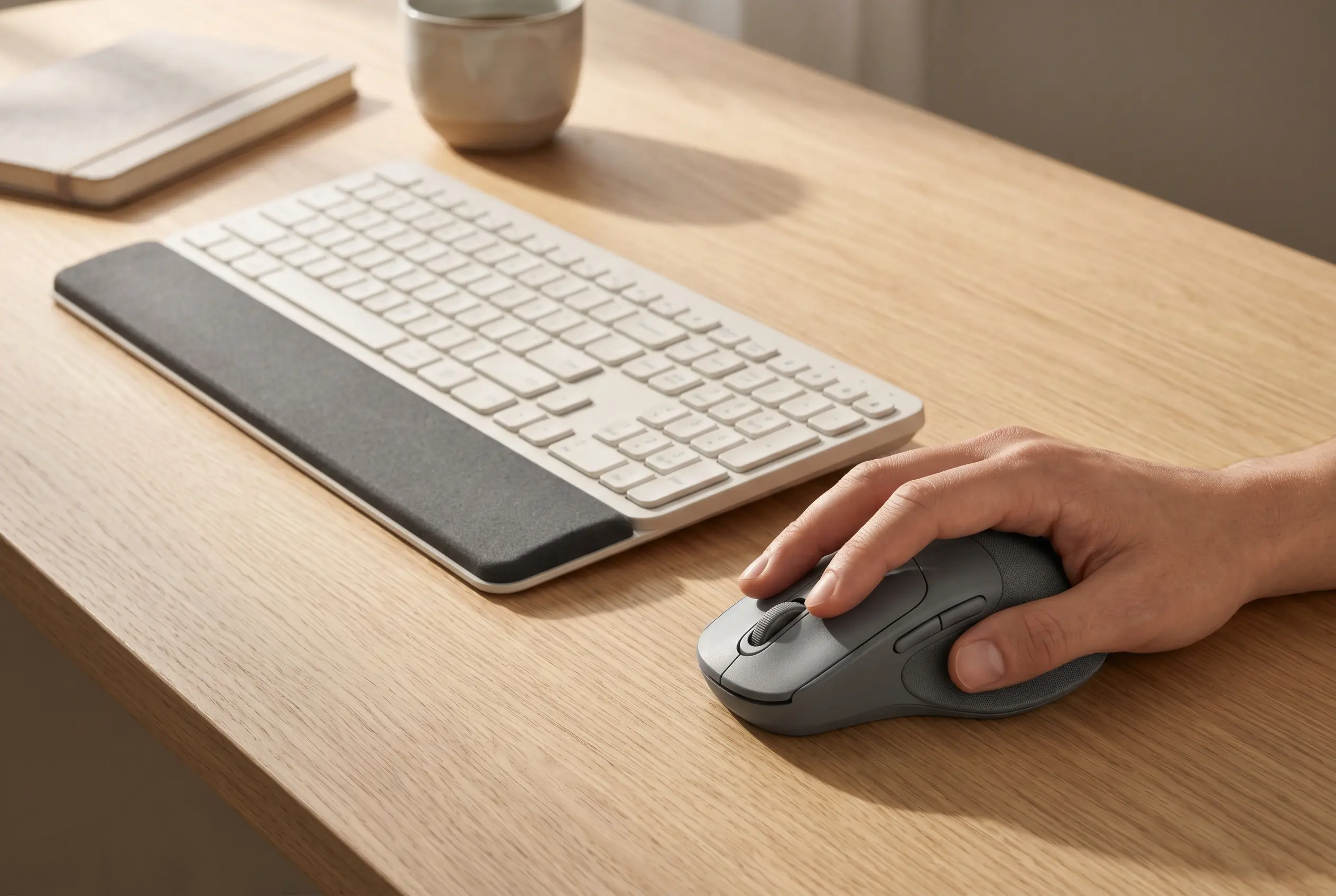
The M850 L’s Padded Palm Rest
The padded rest is what the M850 L is selling. It is fused to the shell rather than detachable, and it sits where the heel of the right palm rests when the hand is in a relaxed claw grip. The shell itself follows the same right-hand sculpt Logitech has shipped on its Signature line for years; the cushion is the only meaningful change.
That said, the M850 L picks up a few touches the Signature M650 series lacks:
- Quiet click engineering on both primary buttons and a soft-scroll wheel, aimed at shared offices and late-night sessions
- Rubberized side grips on both flanks, useful for users who lift and reposition the mouse often
- Bluetooth Low Energy pairing across three devices via Easy-Switch, with the Logi Bolt USB receiver still optional
- A reprogrammable side button for app-specific macros configured in Logi Options Plus
None of that breaks new ground for a mid-priced productivity mouse. The case Logitech is making is that the cushion eliminates the small daily friction of the heel resting on bare plastic for hours. For users who already shove a folded towel under their wrist, it removes a chore.
The MK880 Keyboard’s Tilt and Cushion
The MK880 keyboard is where the engineering effort shows. It is a full-size layout with a numpad and a dampened low-profile switch design that Logitech says hushes the click compared with its membrane Signature K650. The dual-layer foam wrist rest is angled to match a slight downward wrist drop, a position physical therapists have argued for over the traditional flat-rest geometry.
The three tilt stages, 0, 4, and 8 degrees, are the unusual part. Most keyboards in this price band offer a single rear-foot kickstand or no tilt adjustment at all. The 0-degree setting puts the keyboard flat on the desk, which is the position ergonomic specialists generally favor; the 4 and 8 settings exist for users who type with bent wrists and want the tactile feedback of a steeper angle.
The keyboard’s dedicated AI key, sitting where the right Windows key usually lives, is preconfigured to launch a system AI assistant (Copilot, ChatGPT desktop, or a chosen prompt) and is fully remappable in Logi Options Plus. Two AA cells drive the board for a rated three years. A wireless mouse identical to the M840 L ships in the same box.
Where the Wrist-Rest Research Lands
The marketing copy on a $50 mouse will always outrun the science behind it, and Comfort Plus is no exception. Federal and Canadian workplace safety bodies have published on wrist-rest use for decades, and the conclusions are narrower than “more padding equals less pain.”
The OSHA Position
The U.S. Occupational Safety and Health Administration (OSHA, the federal agency that sets workplace safety rules) is direct about how wrist supports should actually be used.
Hands should move freely above the wrist or palm rest while typing, and the pad should contact the heel or palm of your hand, not your wrist.
That guidance from OSHA’s computer workstation eTool flips the intuitive picture: the pad is not for resting on during keystrokes. It is a soft landing between keystrokes. Press into it the whole time and you compress the carpal tunnel from below, which is the opposite of what a wrist rest is supposed to deliver. The MK880’s geometry, with the heel of the hand parking on cushioned foam between bursts of typing, fits that model. Whether the average buyer uses it that way is a separate question.
The CCOHS and Industry Pushback
The Canadian Centre for Occupational Health and Safety guidance on wrist rests is even more guarded. It notes that in most workstation setups, wrist rests offer no measurable ergonomic benefit and can increase risk factors if used as a constant support. Ergo Canada has argued the same point for years.
The counter-evidence is real but specific: research has shown that wrist supports can reduce muscle activity in the neck and shoulders, and can encourage neutral wrist angles, when paired with a properly adjusted chair, monitor height, and keyboard tray. Outside that fully tuned setup, a foam pad is comfort, not therapy. That distinction matters for buyers who think a $100 combo will fix a chronic problem.
How Comfort Plus Stacks Against the MX Vertical
The sharpest comparison is internal. Logitech already sells an actual ergonomic mouse, the MX Vertical, and its design tackles wrist strain at a fundamentally different level than a padded shell.
The MX Vertical holds the hand at a 57-degree handshake angle, which Logitech claims reduces forearm muscle activity by 10 percent versus a flat mouse. The Comfort Plus mice keep the conventional pronated grip and add cushion under the heel. Both approaches address strain; they are not equivalent.
| Feature | M850 L (Comfort Plus) | MX Vertical |
|---|---|---|
| Grip angle | Standard pronated | 57-degree handshake |
| Cushioning | Padded palm rest | None (textured shell) |
| Target buyer | Office user, light to moderate hours | Heavy user, RSI-prone |
| Battery | 1 AA, ~2 years | Rechargeable, ~4 months |
| Price | $49.99 | ~$99.99 retail |
The economics are the story. At half the price of the MX Vertical and with a battery that lasts four times longer between swaps, the M850 L is the mouse Logitech expects most buyers to pick when comfort is the trigger. For the 60 percent of IT professionals who, by some clinical estimates of computer-related RSI prevalence, will develop strain symptoms during a long career, the vertical form is the harder sell but the better intervention.
Why Mainstream Brands Are Adding Ergonomic Lines
The Comfort Plus launch sits inside a broader shift in the peripherals market that few buyers are tracking. Vertical mice, split keyboards, and cushioned add-ons used to be the territory of specialty brands such as Kinesis, Contour Design, and Evoluent, with price tags that scared off casual buyers. The mainstream lineup has been catching up for two years.
Two pressures are doing the work. Hybrid and remote work pushed daily screen hours past what office-furniture standards were built for; corporate health programs and Display Screen Equipment compliance regimes in the UK and European Union have started reimbursing or specifying ergonomic input devices in procurement. The Fortune Business Insights gaming accessories outlook projects the wider input-device market growing at a roughly 9 to 10 percent compound annual rate through 2034, with ergonomic and wellness-led SKUs taking a rising share.
Logitech’s calculation is straightforward. A $50 padded mouse and a $100 cushioned keyboard combo sell into both the consumer aisle and the corporate procurement spec. Adding business-tier variants at $59.99 and $109.99, with the same hardware and a B2B warranty path, lets the IT-services channel ship Comfort Plus into enterprise rollouts where ergonomic-input mandates are already on paper. That dual-channel play is the part of the launch that will probably matter most to Logitech’s revenue line, even if buyers never see it.
For the user typing this paragraph at 6 p.m. on a flat plastic mouse, the trade-off is simpler. Comfort Plus is a real, modest upgrade for moderate desk hours. It is not the answer to a chronic strain problem, and the products that are the answer cost about the same or sit one shelf over in the same store.
Pre-orders open in June on logitech.com and through authorized resellers, with the business SKUs flowing through Logitech’s commercial partner network on the same schedule.






OpenAI Says Apple’s Trade Secret Lawsuit Lacks Any Merit

Lucid’s Bankruptcy Denial Can’t Quiet Wall Street’s Doubts

IBM Stock Suffers Its Worst Trading Day Since the 1987 Crash

Cheap Chinese AI Models Are Undercutting Anthropic and OpenAI

ASML’s AI Chip Forecast Lifts Futures, Deepens Market’s Big Bet

SK Hynix’s Nasdaq Shares Race Ahead of Seoul by Up to 51%

Meta Workers Sue Over AI Layoffs That Targeted Medical Leave

Taco Bell Pulls Lettuce as Michigan Cyclosporiasis Cases Top 3,300

PayPal’s Five-Year Slide Makes It a $53 Billion Target for Stripe

Mega Millions Jackpot Hits $672 Million, but Taxes Claim Nearly Half

Halo Studios Reverses PS Plus for Halo: Campaign Evolved on PS5

Black Ops 1 and 2 PS5 Ports: $40 Price Tag Has Fans Uneasy

Matt Brown Dismisses Rousey and Paul’s MVP MMA Ratings Win Over UFC

Star Wars: Galactic Racer Is a Roguelite Racer With a Podracing Skin

Julius Randle Traded to Nets as Wolves Reclaim Cap Space for Dosunmu

Sega’s $49.99 Sonic Classic and Modern Bundles Hit Switch in October

Colombia Edge DR Congo as Muñoz Books World Cup Knockout Place

Douze Dixièmes Closes Five Months After MIO: Memories in Orbit

Warriors Take Yaxel Lendeborg, the Oldest Pick in the 2026 NBA Draft

Meta’s Muse Image Lets Anyone Use Your Instagram Photos in AI
-

 TECHNOLOGY3 years ago
How to Adjust a Bulova Watch Band – An Easy Guide
-

 News3 years ago
Fred Pentland: Athletic Bilbao’s English mentor who changed the essence of Spanish football
-

 FINANCE3 years ago
Tax Planning for Every Season: Guide to Maximizing Your Tax Benefits
-

 Education3 years ago
African Ministers New Education Plan
-
 BUSINESS3 years ago
What is Entrepreneurial Operating System? A Comprehensive Guide to EOS
-

 Education3 years ago
Innovate Your Learning Journey with Technology and Enhance Education
-

 News3 years ago
Russians formally out of World Athletics Championships
-

 BUSINESS3 years ago
Top 9 Most Expensive American Cities to Rent an Apartment