
News
Claude Code Skips the Screen Takeover to Test iPhone Apps Live
Claude Code’s Mac app now drives Apple’s iOS Simulator directly to test iPhone apps, skipping the screen takeover its computer use feature still needs elsewhere.

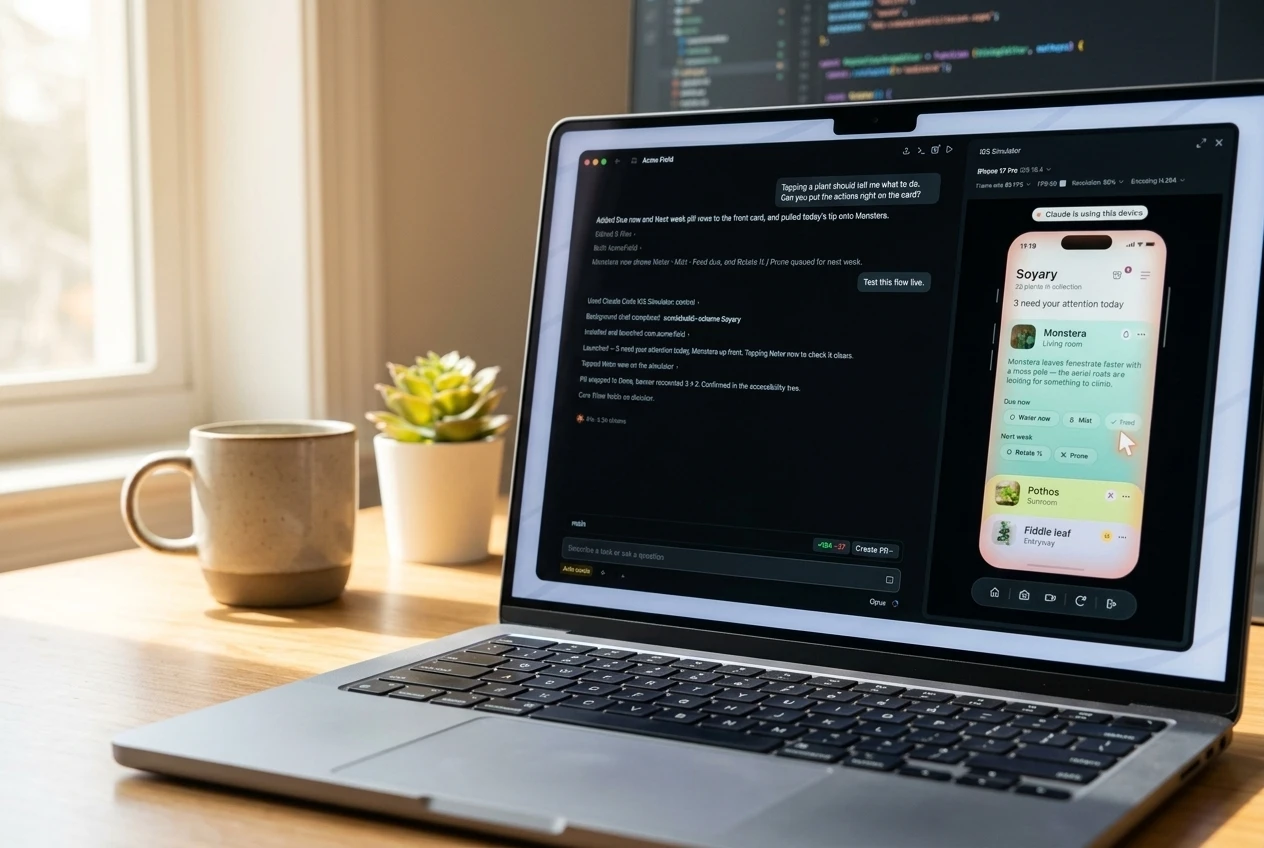
Claude Code’s desktop app can now build, launch and test iPhone apps inside a live iOS Simulator pane, without taking over the user’s screen to do it. Anthropic rolled the feature out in public beta on July 21 for Pro, Max and Team subscribers. It requires a Mac running Xcode with the iOS platform installed.
Claude Code’s command line tool already reached the simulator, but only through Anthropic’s computer use feature, which controls a screen the way a person clicking a mouse would. The new desktop pane skips that step, arriving just as Apple keeps building its own, separate bridge to Claude inside Xcode.
The Pane That Skips the Screen Takeover
The mechanics matter here. Claude Code Desktop version 1.24012.0 opens an iOS Simulator pane next to the chat window whenever Claude is asked to build, run or check an app. Claude installs the build, taps through the interface, and reads the screen to confirm its own work, while the developer watches or takes over the taps themselves.
Anthropic’s own instructions for granting Claude access to a simulated device describe why this avoids the usual overhead. Consent is granted once per device, not once per session, and every tap afterward carries the same trust as a click the user made themselves.
The simulator pane drives the simulator directly, so it doesn’t need computer use and never takes over your screen or hides your other windows.
That is Anthropic’s own description, and it draws a sharp line under the command line version of Claude Code. From the CLI, Claude still reaches the simulator through computer use, controlling it on screen the same way a person would with a mouse, according to the company. The desktop pane is the exception, not the rule, inside Anthropic’s own product line.
Anthropic’s developer relations account, ClaudeDevs, posted the launch clip on July 21, telling developers to tap through the simulator yourself at any time while Claude keeps working in the background. The post specified the feature works only on macOS, since Apple’s iOS Simulator has no other home.
How Anthropic Got Here
Computer use was Anthropic’s first attempt at giving Claude eyes and hands on a real screen. The company introduced it in public beta on October 22, 2024, alongside an upgraded Claude 3.5 Sonnet, letting developers direct the model to click, type and navigate the screen control beta built for Claude 3.5 Sonnet. Early partners included Asana, Canva, DoorDash and Replit.
It was never a clean tool. Anthropic itself called the feature “at times cumbersome and error-prone” when it launched, an unusually candid admission for a company selling autonomy. Computer use also requires broad macOS Accessibility and Screen Recording permissions, the same access a remote-support tool would need, because it genuinely controls the operating system.
Anthropic has kept pushing that model outward since, including a rollout that lets Cowork sessions run by default across mobile, web, and cloud environments rather than a single desktop instance. The iOS Simulator pane moves in the opposite direction. It narrows Claude’s reach to one sandboxed device, in exchange for skipping the permissions computer use still demands everywhere else.
Apple Builds the Same Bridge From Its Side
Anthropic is not the only company connecting Claude to Apple’s development tools, and it is not even first. Apple did that itself, twice.
On September 15, 2025, Apple made Claude Sonnet 4’s general availability inside Xcode 26 official, letting any developer connect a Claude account to power a native coding assistant inside Apple’s own IDE. Then, on February 3, 2026, Apple went further with Xcode 26.3, adding support for agentic coding built around Claude Agent and OpenAI’s Codex. Apple described it as “a new way in Xcode for developers to build apps using coding agents,” giving those agents access to project files and the ability to verify their work by capturing Xcode Previews.
Both tracks exist at once. One lives inside Apple’s own editor, with Apple’s blessing and Apple’s name on the release notes. The other lives inside Anthropic’s separate desktop app and only borrows Apple’s Simulator and build tools underneath. Neither company has said the two are related, and nothing requires a developer to pick just one.
- October 22, 2024: Anthropic launches computer use in public beta for Claude 3.5 Sonnet, letting the model click and type like a person, with broad OS permissions attached.
- September 15, 2025: Claude Sonnet 4 becomes generally available inside Xcode 26 as a native coding assistant, Anthropic and Apple both confirm.
- February 3, 2026: Apple ships Xcode 26.3 with agentic coding, letting Claude Agent and Codex act autonomously inside the IDE itself.
- July 21, 2026: Claude Code Desktop’s iOS Simulator pane enters public beta, giving Claude a direct line into Apple’s Simulator that sits outside Xcode entirely.
Three Ways Claude Touches Apple’s Toolchain
Laid side by side, the three integrations look less like one feature and more like three separate bets on how much control an AI agent should have over a Mac.
| Integration | Where It Lives | How Claude Sees the Screen | Who Can Use It |
|---|---|---|---|
| Computer use | Claude’s API, Bedrock, Vertex AI, and Claude apps generally | Full OS control via Accessibility and Screen Recording permissions | API developers and Claude subscribers broadly |
| Claude in Xcode / agentic coding | Inside Apple’s own Xcode IDE | Reads project files and captures Xcode Previews of SwiftUI views | Any Xcode 26 or 26.3 user with a linked Claude account |
| Claude Code iOS Simulator pane | Anthropic’s own Claude Code Desktop app | Drives the iOS Simulator directly, no OS permissions required | Pro, Max, and Team plan subscribers, not Enterprise |
The third row is the newest, and it is also the most independent of Apple’s own interface. A developer can now watch Claude build, launch and visually verify a working iPhone app entirely inside Anthropic’s app, never opening Xcode’s window at all, even though Xcode’s compiler and Simulator are doing the work underneath.
What Do Developers Have to Grant Claude?
Developers grant Claude one-time permission per simulated device, covering taps, typing, launches, and screenshots of that device only, and the consent never touches the Mac’s broader Accessibility or Screen Recording settings. In practice, setup is a short, sequential process.
- Open the iOS project inside Claude Code Desktop’s Code tab and start a session, using any project that already builds for the iOS Simulator.
- Ask Claude in plain language to build and run the app, or to check a specific flow, such as an onboarding screen.
- Watch the simulator pane open automatically beside the conversation as Claude installs the app, taps through it, and reads the screen to confirm its own changes.
- Grant access the first time Claude uses a given device. Consent applies going forward, so later sessions run without repeated prompts.
Developers can keep tapping and swiping in the same pane while Claude works, alongside the shortcuts already built into Apple’s Simulator app.
The Dependency Anthropic Doesn’t Control
None of this exists without Apple’s cooperation, even if Apple never signed a partnership agreement for this specific feature. The iOS Simulator pane works only because Apple’s Simulator exposes the hooks Anthropic’s engineers built against, and Apple could alter that plumbing in a future Xcode release without warning Anthropic first.
The gap shows up in the fine print. The feature is excluded from Claude’s Enterprise plan entirely, available only to Pro, Max, and Team subscribers, and it works only in local sessions since cloud and SSH sessions cannot reach a simulator running on someone’s own Mac. Anthropic also warns developers against signing into real accounts on any device Claude touches, since screenshots of the simulator are sent to Anthropic’s servers and retained under standard conversation policy.
Developers noticed the asymmetry immediately. One commenter on MacRumors’ forums joked that it was only a matter of time before Apple answered with its own version, “iCode Pro (powered by Siri [powered by Google Gemini]).” The line was a joke, but it named the real tension: Apple supplies the toolchain every one of these integrations depends on, while Anthropic supplies the ambition.
The pattern is not unique to Apple. Anthropic has separately pushed its call for a global pause on frontier AI even as Claude writes and now visually verifies its own code. And on Android, regulators rather than negotiation forced the issue: the EU ordered Android open to AI rivals including Claude earlier this year. Apple faces no equivalent mandate on iOS. Every inch of access Anthropic gets on a Mac, it gets because Apple’s tools allow it, not because any regulator required it.
Apple has not commented on Claude Code’s new simulator pane.
Frequently Asked Questions
Is the iOS Simulator pane available on Claude’s Enterprise plan?
No. Anthropic’s documentation lists the feature as available on Pro, Max, and Team plans only, with Enterprise notably left out of the public beta. That leaves the largest paying customers, often the ones running the biggest iOS engineering teams, without access for now.
What happens if a developer declines to grant Claude device access?
The simulator still boots and still works for the developer’s own taps and swipes. Only Claude’s ability to act on that specific device turns off, according to Anthropic’s documentation, so declining does not block manual testing in the same pane.
How is this different from Claude’s agentic coding tools inside Xcode 26.3?
Xcode 26.3’s agent tools operate inside Apple’s own editor and verify work by capturing static Xcode Previews of SwiftUI views as they’re built. Claude Code’s simulator pane instead runs the whole compiled app live inside Apple’s actual iOS Simulator, from within Anthropic’s separate desktop app rather than Apple’s IDE.
Does Claude Code’s simulator feature work with Android apps?
There is no announced equivalent. The pane is built specifically around Apple’s iOS Simulator, which Anthropic notes runs only on macOS, and neither company has described a comparable Android Studio integration.
Is it safe to test apps that use real login credentials in the simulator?
Anthropic advises against it directly. Screenshots Claude takes of a simulated device are sent to Anthropic’s servers and kept under standard conversation retention settings, so the company recommends never signing into real accounts on a device Claude is using.


Walmart’s $50 Million Opioid Settlement Closes Case Without Admission

California Sues Over $120 Million Morro Bay Wind Lease Buyout

Gilead Bixlenvo FDA Nod Opens Single Pill Path for Complex HIV Cases

Meta’s $18B Kids Deal Forever Shields Data Used to Spot Under-13s

Lettuce Outbreak Drove Record Cyclospora Spike Across 20 States

Amazon Shaves $20 Off M6 Mac Mini Before It Even Ships

SpaceX Louisiana Port Tests Debt Markets on Orbital AI Scale

Microsoft High Lifts Indexes as Small Caps Crack Support

Apple Replays 2015 Saturday Midnight Preorder for iPhone 18 Pro

Updated COVID Shots Clear FDA but Access Friction Hits High-Risk Groups

Take-Two CEO Pushes Netflix Subs for GTA 6 Extended Look

Wildlands Free Update Hands Players the Tools They Already Invented

Destiny 2 Fans Unlock Vaulted Maps After Live Service Ends

Quake Gets 19 Free Maps From MachineGames Quake Club

Quordle Monday Delivers Gavel Crush Speed Ethos Cleanly

Stripe Bid Shows PayPal Moat Cracked After Years of Slide

Tyson’s Five-Year Utah Plant Falls to Cattle Shortage Reckoning

Silver Lake Workday Talks Signal Private Floor for Software

Kennedy Lewis Takes Majority Control of The Greenbrier in $500M Deal

Best Buy Marks 60 Years With Sale That Echoes Its Audio Shop Roots
-

 TECHNOLOGY3 years ago
How to Adjust a Bulova Watch Band – An Easy Guide
-

 News3 years ago
Fred Pentland: Athletic Bilbao’s English mentor who changed the essence of Spanish football
-

 FINANCE3 years ago
Tax Planning for Every Season: Guide to Maximizing Your Tax Benefits
-

 Education3 years ago
African Ministers New Education Plan
-
 BUSINESS3 years ago
What is Entrepreneurial Operating System? A Comprehensive Guide to EOS
-

 Education3 years ago
Innovate Your Learning Journey with Technology and Enhance Education
-

 News3 years ago
Russians formally out of World Athletics Championships
-

 BUSINESS3 years ago
Top 9 Most Expensive American Cities to Rent an Apartment