
GAMING
Minecraft 26.4 Snapshot 2 Redesigns the F3 Debug Screen
Minecraft 26.4 Snapshot 2 redesigns the F3 debug screen, blends fog into the horizon, and still ships without the Ice Caves shown at Minecraft Live.

Minecraft 26.4 Snapshot 2 landed on September 29, 2026 with a redesigned F3 debug screen and new render-distance fog. The Java Team also added a celestial occluder and closed 53 bugs. Ice caves, shown at Minecraft Live on September 26, are not in this build.
The snapshot sits in a tight week. Snapshot 1, seven days earlier, made Vulkan the default graphics path. This one spends that work on the overlay you read and the horizon you stare at.
What the Redesigned F3 Screen Shows
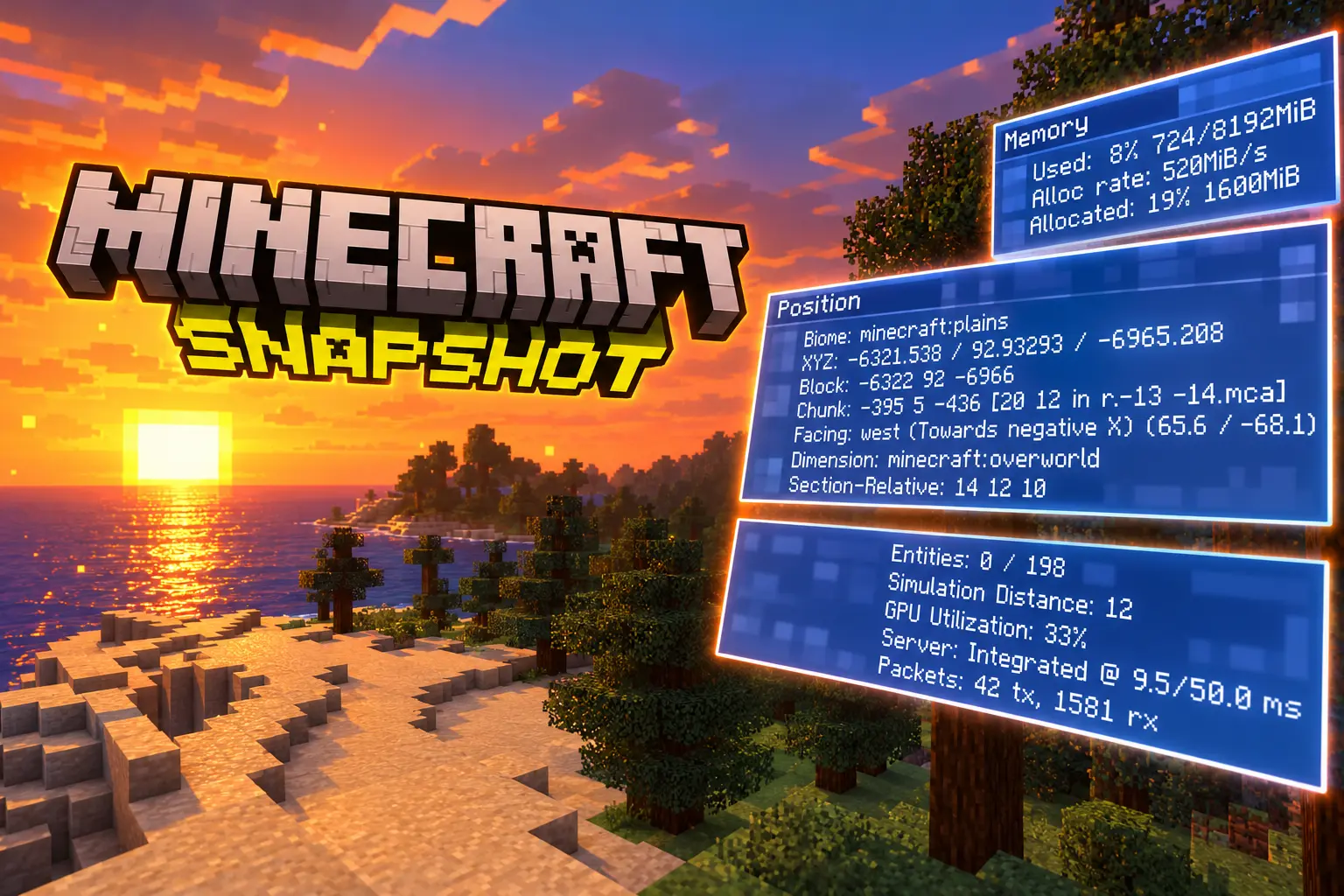
The debug overlay, still opened with F3, is no longer a single dump of mixed-size lines. It is a set of headed panels, grouped so FPS, position, and hardware no longer compete for the same glance. Testers posting before-and-after shots show small boxes with title bars instead of one wall of text.
The Java Team’s notes only say the overlay was redesigned to be easier to read. The layout that shipped is more specific. Top left starts with FPS and refresh rate, then a Position block with XYZ coordinates, then server and packet stats, then a Help block for debug controls. Top right starts with the version string, then memory, then a performance block, then system specs, including whether the session is on Vulkan.
F3 PANEL GROUPS IN SNAPSHOT 2
| Side | What sits there |
|---|---|
| Top left | FPS and refresh rate, Position (XYZ), server and packets, Help |
| Top right | Version, memory, performance, system specs (graphics backend) |
The older customization layer is still there. The overlay still has 28 toggleable elements, plus Default and Performance profiles, and you still open the debug options menu with F3 + F6. Reduced debug info on a server can still hide coordinates even if you turn those lines on locally.
One testing snag showed up on September 30. With Force Unicode Font turned on in language settings, the new overlay can fail to draw until that toggle is off. That is a client font clash, not a change listed in the notes.
Mojang Has Been Rebuilding This Overlay for a Year
This is not the first time Java’s debug HUD has been taken apart. Copper Age snapshots already cut the default clutter, added profiles, and let players pin FPS without opening the full overlay. Later 26.3 work added a separate GUI scale for the overlay, a player-speed line, and a refresh-rate readout. Snapshot 2 is the chrome pass: headers, grouping, and a layout that holds still while you scan it.
That sequence matters because F3 is how Java players read the game they cannot see. Coordinates, chunk files, light, biome, and the graphics backend all live here. Making the default view scannable changes who will actually press the key, not only how it looks in a screenshot.
THE WEEK AROUND SNAPSHOT 2
- September 22, 2026: 26.4 Snapshot 1 ships. Under Graphics API, Default now behaves like Prefer Vulkan, and the game stops auto-flipping that setting after a startup crash.
- September 26, 2026: Minecraft Live announces ice caves, a frozen zombie, ice crystals, and icicles for the fourth drop of 2026, versioned as Java 26.4 and Bedrock 26.70 in Q4.
- September 29, 2026: Snapshot 2 redesigns F3, adds the sky occluder, and blends fog. Minecraft Dungeons II launches the same day.
Vulkan itself is not new in Snapshot 2. The F3 system-specs block is simply where you confirm which backend won. OpenGL remains the fallback on older hardware and drivers.
Fog Meets the Terrain When Transparency Is On
The other half of the snapshot is the horizon. With Improved Transparency on, sky behind terrain, and clouds behind terrain, now blend into terrain render-distance fog. The Java Team’s phrasing is blunt: the boundary between sky and terrain is meant to go invisible.
It is time for the second snapshot for 26.4, featuring improved render distance fog, a new celestial occluder, and a fresh redesign of the F3 screen.
Java Team, Minecraft 26.4 Snapshot 2 notes
That blend is the improved render distance fog the notes lead with, and it is easy to misread in motion. At a far chunk edge the land can look like it is dissolving rather than sitting in mist, because the sky is no longer a hard plane behind the last column of blocks. The setting that drives it is the same Improved Transparency toggle that already controls order-independent transparency.
Clouds No Longer Sit Behind the Fog
Clouds had their own seam. MC-300250, clouds rendering behind foggy terrain, is on the fix list. The shader path matches that bug. OIT support comes out of clouds.fsh, which now draws clouds normally when Improved Transparency is off and into an offscreen target when it is on. A new blit_clouds.fsh shader then composites those clouds onto the OIT targets.
The Skybox Now Covers the Sun and Moon
In the Overworld, the bottom half of the skybox now hides celestial objects: the sun, the moon, and the stars. Mojang shipped that as its own pair of shaders, sky_occluder.vsh and sky_occluder.fsh, which cut the skybox up to a set angle and fill the cut with fog color so the edge is smooth.
Pack makers get a switch for it. The new environment attribute minecraft:visual/has_sky_occluder is a boolean, true in the Overworld, false in the Nether and the End, and it is not interpolated. A custom dimension that wants that fade has to set the attribute. One that wants a raw skybox leaves it off.
Fifty-Three Fixes, Including a 2019 Sky Bug
The fog work also closes a tracker ticket that had been open since the 1.14 era. MC-152504, filed on May 20, 2019, described the sun and moon bleeding through underwater fog at sunrise and sunset when water reached the render-distance cutoff. The sky overlaps fog underwater report is first on the Snapshot 2 list.
Wiki tallies match the official notes: 53 issues fixed. A large share are caption, hyphen, and capitalization strings. The load-bearing gameplay and rendering fixes sit beside them.
FIXES WORTH LOADING THE SNAPSHOT TO CHECK
- Underwater sky seam: MC-152504, sun and moon cutting through water fog at the far chunks.
- Clouds in the fog: MC-300250, clouds drawing behind foggy terrain.
- Swamp mushrooms: MC-312046, mushrooms generating in excess after Snapshot 1; this build restores normal rates.
- Chunk-gen crash: MC-312064, random crashes during chunk generation.
- Mounts leaving water: MC-312066, donkeys, horses, and mules in water could not be ridden onto land without a partial block.
- Creative hit delay: MC-312035, attacking in Creative then switching to Survival added 5 ticks of block-break delay.
- Sculk XP drain: MC-311924, breaking an armor stand or block-attached entity near a sculk catalyst consumed the player’s experience.
- Right Shift unbound: MC-311424, Right Shift registering as Not Bound with some input methods.
Snapshot 1 had already closed 29 tickets, including a stack of old auto-jump-in-water bugs. The two weeks of 26.4 snapshots are doing janitor work in public, not hiding it behind the Live trailer.
Still No Ice Caves in the Snapshot Train
Minecraft Live on September 26 showed ice caves under cold biomes, with icicles, ice crystals, packed ice, calcite, and a frozen zombie that can freeze you and throw ice balls. That drop is Java 26.4 and Bedrock 26.70, aimed at Q4 2026. Three days later, Snapshot 2 still has none of it. The Ice Caves biome page still says the caves have not appeared in any development version.
Creator wattles put the mood in one line when the snapshot posted: “No Ice Caves yet (as expected tbh).”
That gap is the point of this build, not a leak. Mojang used the week after Live on the renderer and the debug HUD. The caves, the unnamed frozen zombie, and the Freezing effect remain trailer assets until a later snapshot actually generates them. Anyone loading 26.4-snapshot-2 for a first look at the drop will find swamp mushroom rates, a prettier F3, and a different sunset, not a new cave.
Format 99.0 Brings a Dedicated Sky Occluder
Resource packs move to 99.0. Data packs move to 122.1. Snapshot 1 had been 98.0 and 122.0. Custom packs that skip those numbers will nag or fail to load.
PACK VERSIONS ACROSS THE TWO SNAPSHOTS
| Pack | 26.4 Snapshot 1 | 26.4 Snapshot 2 |
|---|---|---|
| Data pack | 122.0 | 122.1 |
| Resource pack | 98.0 | 99.0 |
The resource-pack delta is the sky work. screenquad.vsh is renamed screentriangle.vsh, because the mesh has been a single triangle for a while. clouds.fsh no longer carries OIT. blit_clouds.fsh and the two sky_occluder shaders are new files a shader pack has to know about. Data packs pick up has_sky_occluder and a below_heightmap predicate that checks whether a position sits under a named heightmap.
That is also why the Copper Age F3 work still matters here. Those snapshots already made the overlay less cluttered and more configurable, including a Performance profile that could show FPS without dragging the whole debug pass. Snapshot 2 does not replace that menu. It restyles the overlay the menu feeds.
The launcher lists the build as 26.4-snapshot-2, and it still needs Java SE 25. Mojang’s install note is the same as every snapshot week: enable snapshots under Installations, and back up worlds or run the build in a separate folder, because test versions can corrupt saves.

Final Fantasy Resonance Turns a Dead Gacha Into HD-2D

PHP2Shell Forced Sites Offline While Exploits Stalled

Kindle+ Folds AI Audiobooks Into the Page-Read Fund

Chip Stocks Fall as the Bond Rally Cheapens AI Spend

Comcast’s Record Odyssey Quarter Doubles as the Exit

Microsoft 365 Auth Fault Took Down Exchange and Teams

Xbox Caps Game Pass Cloud Gaming at 15 Hours

OpenClaw 2.0 Ships a Team Workplace With Host-Trust Defaults

OpenAI Unveils GPT-6 Astra With a Critical Cyber Label

Diesel Breaks Its Record as the White House Claims Credit
-
 NEWS2 months ago
Microsoft 365 Auth Fault Took Down Exchange and Teams
-
 GAMING2 months ago
Xbox Caps Game Pass Cloud Gaming at 15 Hours
-
 NEWS2 months ago
OpenAI Unveils GPT-6 Astra With a Critical Cyber Label
-
 NEWS2 months ago
OpenClaw 2.0 Ships a Team Workplace With Host-Trust Defaults
-
 BUSINESS2 months ago
Diesel Breaks Its Record as the White House Claims Credit
-

 LIFESTYLE2 months ago
Squishy Dumpling Toys Recalled After Hiding Illegal Water Beads
-

 BUSINESS2 months ago
ChargePoint Stock Rally Prices Wilmer’s Three-Year Cash Plan
-

 AUTO2 months ago
Tesla Puts Its Wheel-Free Cybercab on Austin Streets