
NEWS
iPhone Duo Split View Makes the iPad Mini Look Unfinished
iPhone Duo Split View runs two apps from a Home Screen drag, a simpler split than iPadOS 27 still requires on the iPad mini.

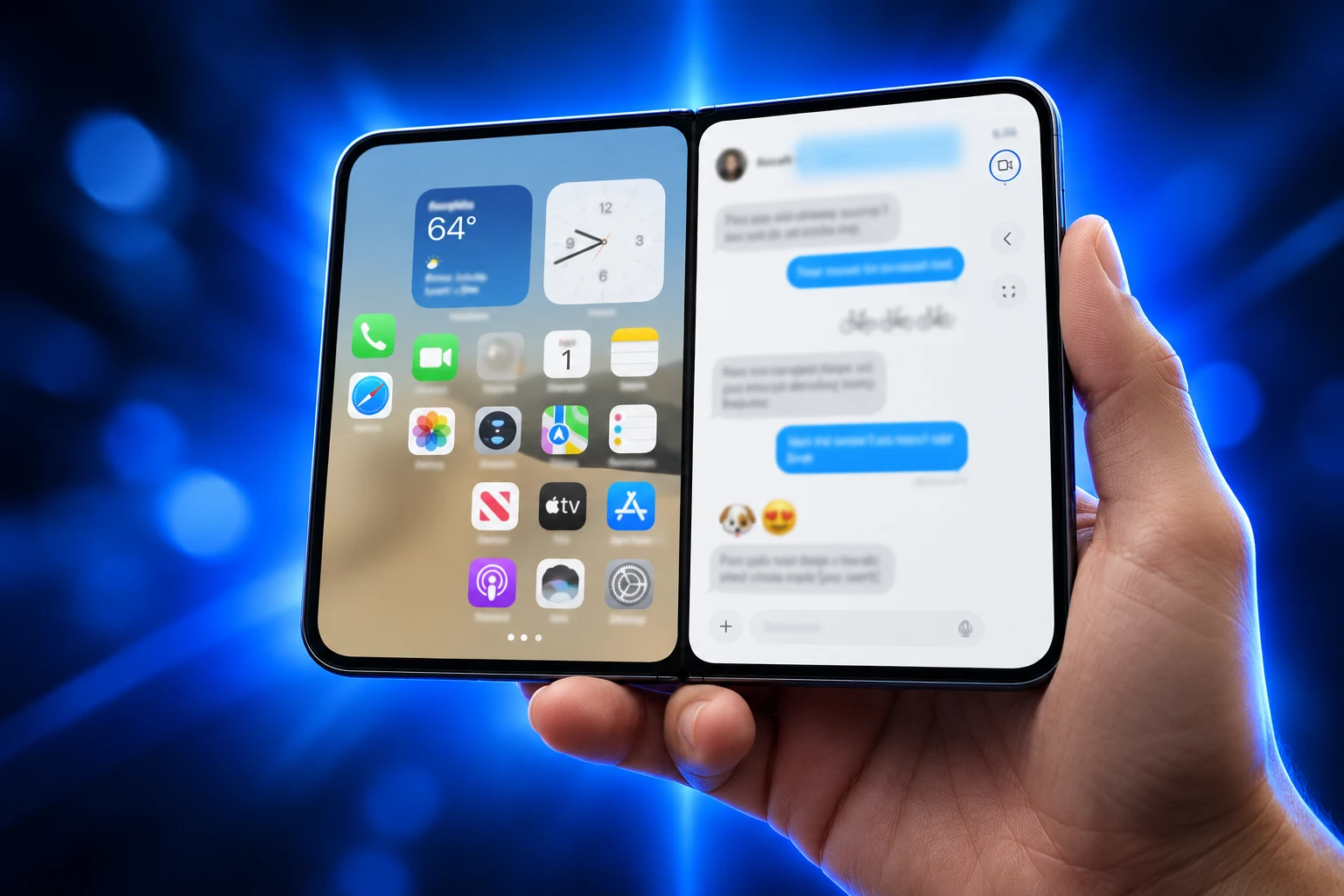
iPhone Duo Split View lets two apps share the 7.6-inch inner display from a Home Screen drag, without the windowing iPadOS still requires. Apple introduced the first foldable iPhone on September 9, 2026, and said users can open two apps side by side on iPhone for the first time.
The inner canvas is a 50 percent larger inner display than iPhone 18 Pro Max, and the phone goes on sale October 23 from $1,999. The catch for Apple’s own tablet line is sitting one product over: iPadOS 27, due September 14, still treats a simple split as a windowing feature.
A 50/50 Split Built on the Home Gesture
Duo’s split is a phone gesture, not a desktop. Apple’s developer session shows you drag an app with the home indicator, park it on one half, and pick the second app while the rest of the Home Screen is still in view. The result is a 50/50 pair of panes that run on their own.
Controls shift to the outer edge of whichever pane you are in, so thumbs stay off the hinge. When the phone is open, iOS 27 also shows two Home Screen pages, with Today View widgets on the left and icons on the right, and it moves the Dock and navigation to the side to free vertical space.
WHAT SPLIT VIEW CAN DO ON DUO
- Two apps at once: Drag one app to a half, then launch another beside it on the 7.6-inch inner panel.
- Same-app windows: Open two Safari windows, or two views of another app, for comparison work.
- Saved pairs: Store a pair of apps and return to that layout later without rebuilding it.
- Siri AI beside content: Keep a page or photo visible while the assistant runs on the other half.
- Every app is in: Apple told developers that all apps take part in this layout on Duo.
Netflix, Zoom, and Slack are already using the folding layout, per Apple’s September 9 newsroom note. Third-party apps that already resize on iPad get a head start; apps that never learned that lesson will look squeezed in a 50/50 pane, the same way they did on old iPad Split View.
With the largest display ever on iPhone that still fits easily in your pocket, combined with the power of A20 Pro, iPhone Duo helps you stay more immersed and productive wherever you go, whether you’re enjoying content, multitasking across apps, or gaming.
John Ternus, CEO, Apple newsroom, September 9, 2026
Pre-orders open October 16. The software story is already doing more work than that calendar, because Apple built this split on iPhone gestures instead of the iPad window manager.
iPadOS 26 Put the Old Split Behind Windows
iPad owners have used a two-app layout since 2015, when iOS 9 shipped Split View and Slide Over. Those tools were light enough for 8-inch glass and they survived Stage Manager. iPadOS 26 then replaced them with a Mac-style windowing system: traffic lights, free resize, tiling, Exposé, and a menu bar.
Apple’s own update notes still describe that windowing system as the way you “fluidly resize apps and place windows exactly where you want.” The first public builds dropped the old names from Settings, and the old swipes stopped doing anything. People who just wanted a 50/50 pair had to live in full screen or commit to windows.
HOW IPAD SPLIT VIEW CAME BACK
- 2015: Split View and Slide Over arrive on iPad with iOS 9 as the basic two-app tools.
- 2025, iPadOS 26: A new windowing system ships; the old Split View and Slide Over modes are gone at launch.
- iPadOS 26.1: Slide Over returns as a windowing option, a floating pane you hide off the edge.
- iPadOS 26.2: Apple restores drag and drop gestures for tiling from the Dock, plus Slide Over from a Dock drag.
- June 2026, iPadOS 27: The pitch is faster window switching and a menu bar that can stay on, not a classic split that runs with windowing off.
- September 9, 2026: iPhone Duo gets Home-gesture Split View, saved pairs, and a video pin on the inner display.
The restored iPad split is real, and it is still a window. You turn Windowed Apps on, then tile. Long-press the traffic lights if you want extra Split View and Slide Over toggles. That is a lot of chrome for a tablet you hold in two hands with no keyboard.
The iPad Mini Is Only 0.7 Inches Larger
Apple’s small tablet is the awkward neighbor. iPad mini uses an 8.3-inch Liquid Retina panel, so the diagonal is only 0.7 inches up from Duo’s inner glass. The mini starts at $599, uses an A17 Pro chip, and is already on sale with Apple Pencil Pro. Duo is a phone that folds into a 5.4-inch outer display, which Apple says holds 90 percent of the screen area of iPhone 18 Pro.
DUO VERSUS IPAD MINI
| Device | Main canvas | Starting price | Two-app path |
|---|---|---|---|
| iPhone Duo | 7.6-inch inner OLED | $1,999 | Home-gesture Split View |
| iPad mini | 8.3-inch Liquid Retina | $599 | Windowing, then tile or Slide Over |
The mini is still the cheaper, taller slab, and it is the device where windowing feels heaviest. Floating windows, traffic lights, and a menu bar eat the 8.3-inch rectangle. Duo’s inner panel is also a 3000-nit OLED with a nano-texture finish; the mini’s LCD peaks at 500 nits. Hands-on comparisons after the September 9 event keep circling the same question: if the fold already does two apps, what is the mini for besides price and a Pencil that works on day one?
Duo Pins a Video Above a Second App
Apple’s design session adds a layout iPad still does not copy. When picture-in-picture is playing, you can pin the video to the top of the inner display and let the current app shrink into the space below. Fold the phone part way and the video grows to fill a half, while the app reflows under it in real time.
That is a phone-and-show layout, not a desktop window. You can watch and message without hunting a Slide Over handle. Two videos at once still will not play; if the lower app starts its own clip, the pinned one pauses, because Duo is still iOS underneath. The pin is the part tablet owners have been asking for on long flights and on the couch, and it shipped on the fold first.
Apple Pencil with USB-C comes to Duo later this year, on either display. Until then the mini keeps the drawing job. The video-plus-app job has already moved.
More Panes Already Run on a Rival Fold
Calling Duo’s split a first is true only inside Apple. Android folds have run side-by-side apps for years, and the week after the event a HyperOS 4 clip of Xiaomi’s latest foldable spread as a rebuke: more than two panes, shuffled without a window manager. Replies claimed three-way tiles and extra waiting apps. Treat that as a vendor demo, not a lab test. The point still stands. Duo did not invent the foldable split.
What Apple invented, for itself, is a version that feels like iPhone. One home gesture, a hard 50/50, saved pairs, and no Stage Manager tax. That is why the sting is in-house. The iPad is the product that used to own “two apps, no keyboard,” and the new phone now does that cleaner than iPadOS 27 does on glass the same size class.
Price talk runs the other way. $1,999 buys the fold, or it buys a slab iPhone plus a mini and still leaves change. People who want one pocket device will not do that math. People who already own a mini will.
Why iPadOS 27 Still Hides Simple Split View
iPadOS 27, out September 14, speeds up window switching and can keep the menu bar on. Split View and Slide Over remain windowing features. There is still no classic mode that full-screens apps until you drag a second one beside them, the way Duo does from the Home Screen.
WHAT IPADOS 27 ADDED INSTEAD
- Faster windows: Switching and closing windows is the stated upgrade, not a new two-app grammar.
- Menu bar option: The bar can stay visible, which helps a Magic Keyboard and does little for a bare mini.
- No off-ramp: You still pick full screen or windowing; the simple split is not a third mode.
Apple has spent a year making iPadOS closer to macOS for people who dock a keyboard. Duo is the opposite bet: a pocket canvas that never asks you to manage windows. iPadOS is still a cousin of iOS, which is why the missing port is so sharp. The company already taught every app to resize for Duo. It chose not to offer that same Home Screen drag on the tablet that has more pixels to spare.
The $1,999 Phone Now Does the Mini’s Old Job
THE DATES THAT LOCK THE SPLIT
- September 14: iOS 27 and iPadOS 27 go out to the public, windowing still the iPad path.
- October 16: Duo pre-orders open at 5:00 a.m. PT, from $1,999 or $83.29 a month for 24 months.
- October 23: The foldable reaches stores in star white and night sky, with A20 Pro and Touch ID in the side button.
- Later this year: Apple Pencil with USB-C arrives on Duo; the mini already has Pencil Pro.
The mini remains the buy if you want 8.3 inches, a lower price, and a Pencil today. It is no longer the buy if you want two apps without learning a window manager. Apple already engineered the simpler system. It put it on the $1,999 phone.
iPadOS 27 still goes out on September 14 with windowing as the path to two apps. iPhone Duo goes on sale October 23 with a Home Screen drag that does the same job in one move.

Liberty Parks MotoGP on Formula 1’s Austin Stage

The Salary Cap Fight That Can Freeze Baseball’s TV Payday

The 2027 Mercedes GLE and GLS Keep Alabama Busy

Margaret Hamilton Dies at 90 With a Harder Fight Unfinished

Unity Parks Its Engine Inside Google’s Prompt Games

Microsoft 365 Auth Fault Took Down Exchange and Teams

Diesel Breaks Its Record as the White House Claims Credit

Xbox Caps Game Pass Cloud Gaming at 15 Hours

IFA 2026’s Weird Gadgets Are Building a Sensor Home

Tesla Puts Its Wheel-Free Cybercab on Austin Streets
-
 NEWS2 months ago
Microsoft 365 Auth Fault Took Down Exchange and Teams
-
 GAMING2 months ago
Xbox Caps Game Pass Cloud Gaming at 15 Hours
-
 BUSINESS2 months ago
Diesel Breaks Its Record as the White House Claims Credit
-
 AUTO2 months ago
Tesla Puts Its Wheel-Free Cybercab on Austin Streets
-
 NEWS2 months ago
IFA 2026’s Weird Gadgets Are Building a Sensor Home
-

 NEWS2 months ago
OpenAI Unveils GPT-6 Astra With a Critical Cyber Label
-

 NEWS2 months ago
OpenClaw 2.0 Ships a Team Workplace With Host-Trust Defaults
-

 NEWS2 months ago
Sony and Warner Sue Anthropic Over Torrented Song Lyrics