
NEWS
One UI 9 Turns the Side Key Into a Lockdown Trap
One UI 9 turns the Galaxy side key into auto lockdown for theft, while a Quick Settings toggle leaves the hardware button on.

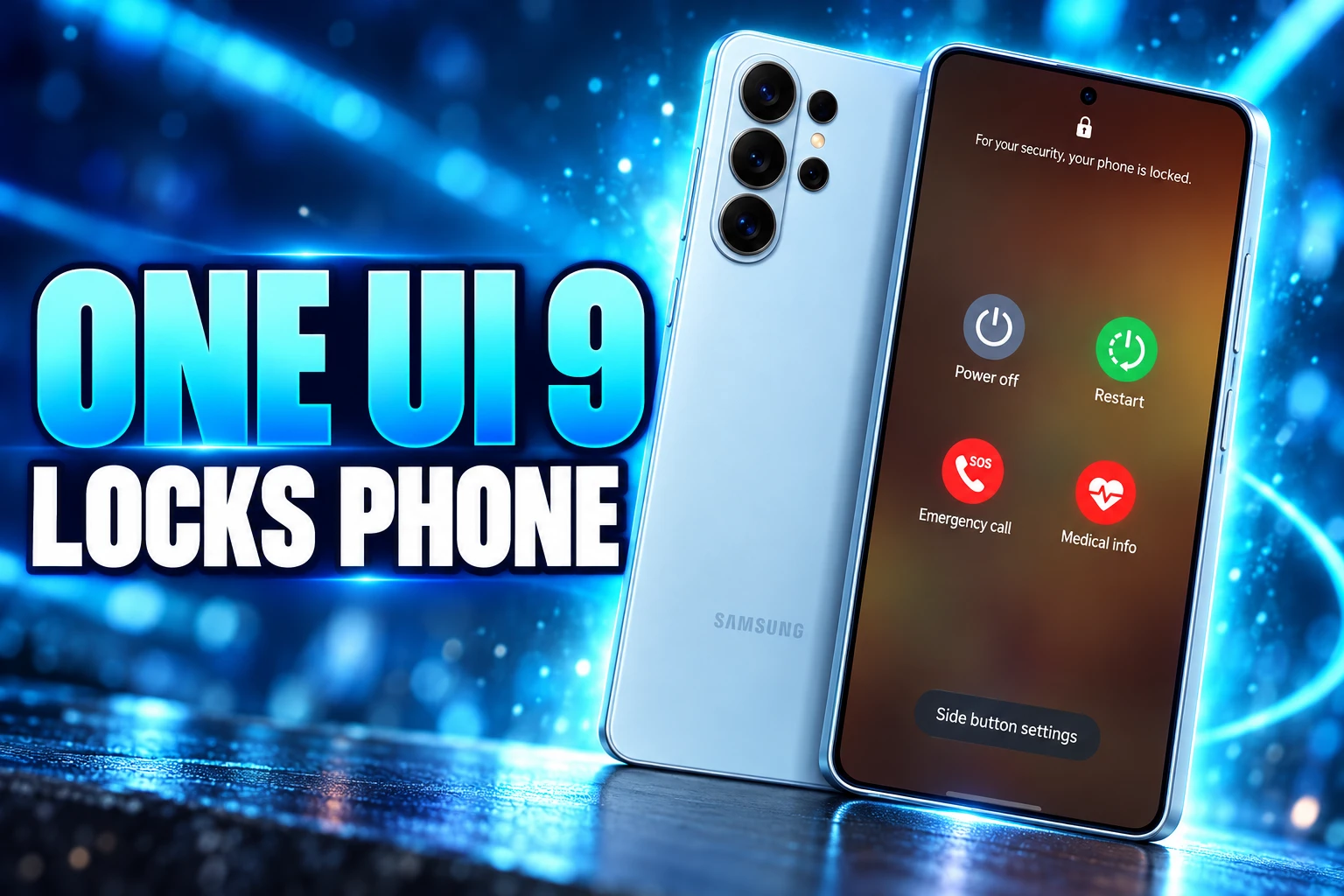
One UI 9 locks a Galaxy phone and kills fingerprint and face unlock as soon as the power menu opens. The old Lockdown button is gone. Medical info sits in its slot, and a PIN, pattern, or password is the way back in.
By mid-July 2026, Samsung had printed a warning on that menu and added a toggle that only covers the Quick Settings power icon. Long-pressing the side key still has no off switch.
The Side Key Now Locks More Than the Screen
On One UI 8.5, holding the side key (or holding side key plus volume, depending on your shortcuts) opened the usual power sheet. Dismiss it with no tap and you dropped back into the app you were using. Lockdown was a separate control on that sheet, and only if you had turned the shortcut on.
Aamir Siddiqui tried the new path on a Galaxy S26 Ultra running One UI 9 beta 2, built on Android 17. Opening the power menu no longer behaved like a pause. It invoked Lockdown on the spot, he said, locking the phone and shutting off fingerprint and face unlock. Closing the sheet did not return you to the last app. It put you on the lock screen.
You also need the PIN, pattern, or password to power the phone down or restart it from that menu. The side key is still the hardware control for power, SOS, and restart. It is now also the control that strips biometrics for the next unlock.
One UI watcher Tarun Vats put the theft case in plain terms on May 31, 2026, after the build started sending people to the lock screen: it becomes harder for a snatched phone to power off. The June 1 hands-on work matched that read. The dedicated Lockdown row was already gone.
What Lockdown Cuts Off
Lockdown is not a second PIN and it does not wipe fingerprints from the phone. It freezes the easy unlock paths for one cycle, until someone types the credential. On One UI 8.5 that freeze was a choice. On One UI 9 beta 2 it became the cost of opening the power menu, even if the phone was already unlocked in your hand.
WHAT LOCKDOWN SHUTS DOWN
- Fingerprint and face: Both stay on the device, but they cannot unlock it until the PIN, pattern, or password is entered once.
- Smart Lock: Trusted places, trusted devices, and keep-unlocked helpers are suspended for that lock cycle.
- Lock-screen notices: Notification contents on the lock screen are hidden while Lockdown is in force.
- Power off and restart: Those actions demand the same credential, so a thief cannot shut the radio down from the menu.
- Mobile data and Wi-Fi: Those toggles cannot be flipped in this state, which keeps the phone easier to find and ping.
Siddiqui noted the sleeping-person case as well as the street snatch: someone pressing a finger to the sensor while you are out of it still hits a PIN wall if Lockdown is on. That was always the point of the old button. The new design assumes you wanted that wall the moment you asked the phone for its power sheet.
A Snatch-and-Power-Off Window Closes
The useful target is not a hacker in a lab. It is the ten seconds after someone yanks an unlocked Galaxy out of your hand. The first thing many thieves try is power off, because a dead phone stops ringing, stops sharing a location, and stops taking a lock-screen “this phone is lost” message.
Asif Iqbal Shaik, writing after the beta 2 menu screenshots landed, said that once the power menu is open the phone is already in Lockdown. A snatch victim’s device then refuses power off without the PIN or password, and it also refuses the usual mobile data and Wi-Fi flips. The radios stay up. Find My Mobile still has a live target.
That is a real gain on a phone that used to let an unlocked session reach Power off with one more tap. The old Lockdown row asked you to think of it in the same second someone was pulling the handset away. Most people never found that row. Plenty never turned the shortcut on.
The catch, which Samsung later had to treat as a product problem, is that the same side-key press is how owners reboot a frozen app, start Emergency SOS, or, in this menu, open medical details for a first responder. Those are not panic-lock gestures. They now share a pipe with one.
Medical Info Takes the Old Button’s Slot
The power sheet did not shrink into a lock dialog. Samsung restacked it. The Lockdown control is no longer a button you can miss, because it is no longer a button. In its place the menu shows Medical info, the emergency card first responders are meant to read when a phone is in reach and the owner is not.
That swap tells you who Samsung is designing the visible rows for. A paramedic does not need a biometric kill switch. A paramedic needs blood type, meds, and an ICE contact. The security move moved under the sheet itself, where nobody has to remember a label.
It also means you can open Medical info and still get locked out of fingerprints when you leave. The emergency card and the lockdown tax now share a doorway. If you only wanted the card, you still pay the PIN on the way back to the home screen.
On older One UI builds, Lockdown itself was easy to hide. The shortcut lived behind Show Lockdown option in Secure lock settings, a screen most owners never opened. Hiding it did not remove the PIN. It only kept the power menu short. One UI 9 inverts that. The shortcut is gone, and the protection is the menu.
A Toggle That Does Not Touch the Side Key
Beta testers did what testers do: they opened the power menu to look at it, then wondered why the fingerprint sensor was dead. Samsung’s answer in One UI 9 beta 4, out for the Galaxy S26 series by July 15, 2026, was not to restore the Lockdown button. It was to split the two ways you reach that menu.
A new setting, Secure lock with Power button, sits under Settings, then Lock screen and AOD, then Secure lock settings. Samsung’s own summary string on the toggle says tapping Power in the quick panel locks the phone with extra security, and biometrics cannot be used until you unlock with your PIN, password, or pattern.
In beta 2 and beta 3, that Quick Settings power shortcut behaved like a long-press of the side key. It opened the menu and turned Lockdown on. In beta 4 the shortcut’s default flips. Leave the new toggle off, dismiss the sheet, and you go back to the last app. Turn the toggle on, and the shade’s power icon becomes a lockdown key again.
The physical side key does not read that toggle. Long-press it, and Lockdown still runs. Samsung gave people a way to reboot from the shade without a PIN wall. It did not give them a way to do the same from the hardware button that thieves actually mash.
POWER MENU BEHAVIOR BY BUILD
| Build | Physical side key | Quick Settings power icon | Lockdown button |
|---|---|---|---|
| One UI 8.5 | Opens the menu; Lockdown is a manual tap | Opens power options without the new auto-lock | Shown if you enable the old shortcut |
| One UI 9 beta 2 | Auto Lockdown on open; PIN to power off or restart | Same auto Lockdown as the side key | Removed; Medical info in the slot |
| One UI 9 beta 4 | Still auto Lockdown; warning line on the menu | No auto Lockdown unless Secure lock with Power button is on | Still removed |
That table is the whole compromise. The gesture a stranger can force with a thumb on the edge stays hostile. The icon you hunt for in the shade can be ordinary again.
Why Samsung Printed a Warning on the Menu
Auto Lockdown was quiet enough that people thought the phone had glitched. On July 16, 2026, Vats posted a One UI 9 beta shot (build ZZG4 in his caption) with a new line on the sheet itself: For your security, your phone is locked. Leave the menu, and you unlock with PIN or pattern, not a finger.
For your security, your phone is locked.
On-menu copy in One UI 9 beta 4, posted by Tarun Vats, July 16, 2026
A mid-July software note said Samsung was a day from putting stable One UI 9 on its next flagship foldable phones, with July 21, 2026 as the expected date. The warning and the Quick Settings split were the last documented tweaks before that window. There is still no public changelog line that says the side-key path changed again after beta 4.
HOW THE POWER MENU CHANGED FROM MAY TO JULY
- May 31, 2026: Vats posts that leaving the One UI 9 power menu now returns a Galaxy to the lock screen instead of the last app, and frames it as a snatch-and-power-off fix.
- June 1, 2026: Hands-on on a Galaxy S26 Ultra with One UI 9 beta 2 confirms Lockdown is built into the menu, the old button is gone, and a PIN is required to power off or restart.
- July 15, 2026: One UI 9 beta 4 adds Secure lock with Power button; the Quick Settings power icon stops auto-locking unless that switch is on; the side key still auto-locks.
- July 16, 2026: The power menu gains the line that the phone is locked for security, so the new state is visible before you dismiss the sheet.
- July 21, 2026: Samsung is expected to debut stable One UI 9 on its next flagship foldable phones, with beta 4 as the last detailed public look at this behavior.
The warning is an admission in four words. If owners understood that opening Power off also locked the biometrics, Samsung would not have needed to label the sheet like a vault door.
Restart and SOS Send You to a PIN Screen
The theft logic holds. An unlocked phone that can be killed from the power menu is a phone that vanishes off the map. Building Lockdown into that menu closes the window without asking a scared owner to find a row they never enabled. Forcing a PIN to power off is the part that actually matters on the street.
The daily cost lands on everyone else who uses the same key. Restart a buggy app from the side button and you type a code. Open SOS, change your mind, and you type a code. Peek at Medical info, swipe the sheet away, and the fingerprint sensor is dead until the credential lands. Some owners in Vats’s thread wanted the bar even higher, including a fingerprint just to open the power menu. Samsung went the other way on the shade, and left the hardware key hot.
iPhone owners in that thread recognized the gesture immediately. Holding the side button is already a high-stakes moment on that hardware, not a casual peek. Galaxy software is now treating the same press as a lock event, then selling a shade shortcut as the escape hatch for people who only wanted Restart.
Leave Secure lock with Power button off, and the Quick Settings power icon is a power icon again. Long-press the side key, and One UI 9 still drops you into Lockdown, still hides the easy unlock paths, and still asks for the PIN before the phone will die, reboot, or let a finger work.

The Salary Cap Fight That Can Freeze Baseball’s TV Payday

The 2027 Mercedes GLE and GLS Keep Alabama Busy

Margaret Hamilton Dies at 90 With a Harder Fight Unfinished

Unity Parks Its Engine Inside Google’s Prompt Games

The Hidden Vendor Cut in 403(b) vs 401(k) Plans

Microsoft 365 Auth Fault Took Down Exchange and Teams

IFA 2026’s Weird Gadgets Are Building a Sensor Home

Xbox Caps Game Pass Cloud Gaming at 15 Hours

Squishy Dumpling Toys Recalled After Hiding Illegal Water Beads

Tesla Puts Its Wheel-Free Cybercab on Austin Streets
-
 NEWS2 months ago
Microsoft 365 Auth Fault Took Down Exchange and Teams
-
 GAMING1 month ago
Xbox Caps Game Pass Cloud Gaming at 15 Hours
-
 NEWS1 month ago
IFA 2026’s Weird Gadgets Are Building a Sensor Home
-

 NEWS1 month ago
OpenAI Unveils GPT-6 Astra With a Critical Cyber Label
-
 AUTO1 month ago
Tesla Puts Its Wheel-Free Cybercab on Austin Streets
-

 NEWS2 months ago
OpenClaw 2.0 Ships a Team Workplace With Host-Trust Defaults
-

 NEWS2 months ago
Sony and Warner Sue Anthropic Over Torrented Song Lyrics
-
 LIFESTYLE1 month ago
Squishy Dumpling Toys Recalled After Hiding Illegal Water Beads