
NEWS
iFixit Finds HomeView Glued Shut After Repair Gains
iFixit’s HomeView teardown shows Apple’s iPad and HomePod repair gains stopped at the kitchen hub, with glue, broken parts, and a $279 fix.

iFixit’s Apple HomeView teardown, published November 17, found display glue that held harder than on any Apple product the shop had opened recently. Technicians ripped a speaker connector, snapped a driver in two, and put more force on the thin logic board than they were comfortable with.
They had walked in expecting the opposite. Recent iPads gained easier battery access, replaceable USB-C ports, and official repair manuals, and the second-generation HomePod opened without a hacksaw.
An iPad Stuck to a HomePod, Then Glued Shut
Carsten Frauenheim, Elizabeth Chamberlain, and Shahram Mokhtari wrote that HomeView looked like a 7-inch iPad display on a HomePod mini, with a few screws holding the two together. That read was too simple. By the time the unit was open, they had damaged parts they had meant to inspect.
Apple HomeView went on sale November 13 at $299 for the tabletop model and the wall-mounted model. The shop published a teardown and 3D CT scan of both variants four days later, after running each through a Lumafield Neptune scanner.
The scan looked friendly at first. A small board sat near the top, antennas flanked it, and large speakers filled the lower display. A central pivot joined the screen to the speaker base, so the two halves looked like separate assemblies. Getting behind the glass still meant going through a fragile front panel, the same first move as on an iPad.
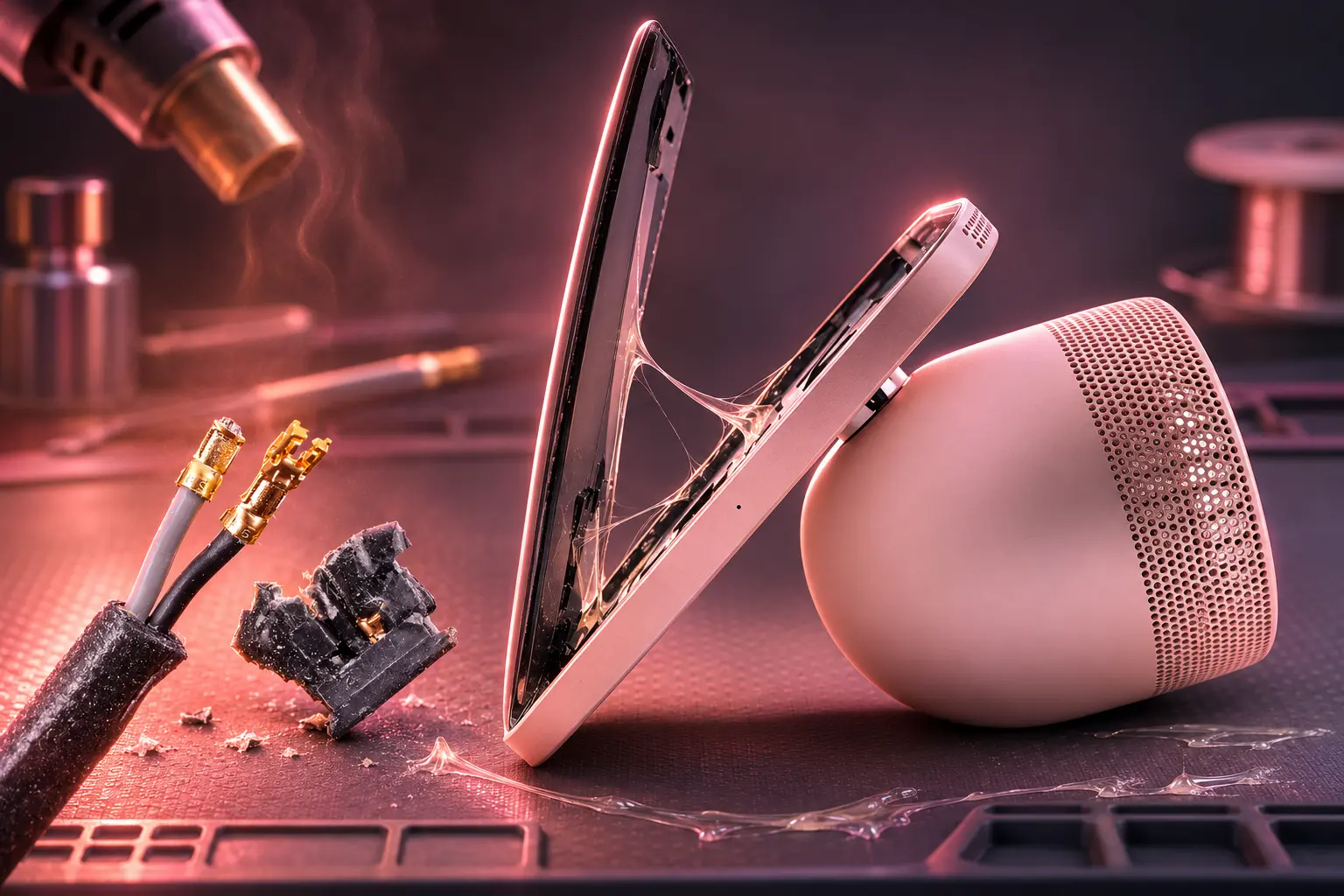
The Display Fought the Heat Mat for Hours
The screen fit the heat mat, but the aluminum body carried that heat away, so the wait ran long. Even then, the glue held harder than on any recent Apple product the team had opened, which is a strange fight for a device that lives on a kitchen counter.
With the glass up, most of the cavity was speakers. The bracket over the display’s press connector used a Phillips screw on one side and a Torx screw on the other. Antenna coax used Phillips again, then the camera bracket needed a larger Torx bit, so the bench spent the session swapping drivers for a job that needed one type.
Apple did this for years on iPhones. iFixit still does not see why a single bracket needs two bits, in a factory or in a shop.
WHAT BROKE ON THE BENCH
- Left speaker plug: Light glue around the connector would not give, and the leads ripped out of the plastic housing, which stayed as if it had been bonded to the board.
- Right speaker plug: Scraping, heat, and a knife along the seams still would not free it intact. iFixit compared the brittle housings to Steam Deck haptics and the M4 Mac mini power button.
- Full-range driver: Thick adhesive pads held the large speakers. Isopropyl alcohol dripped out through the grilles, a metal pry tool bent, and one speaker snapped in two.
- Top microphone: Side mics came out cleanly, but a third mic sits under a bracket that is both screwed and glued.
Speakers are moving parts that wear out. Most laptop makers mount them with screws or isolation grommets, and Apple’s own MacBook team uses a much lighter glue on machines that ride in backpacks. HomeView sits still, and it still got the pads that break the driver on the way out.
Speaker Connectors That Snap Instead of Unplug
Those plugs are built to go in and stay in. iFixit called that a known-bad design, then found it glued down on a hub that never leaves the counter. A kitchen unit stays in the house for years, longer than a phone, so a connector you cannot release is a longer lock-in than it first appears.
Independent shops were already hitting the same wall. Before the write-up went public, repair techs warned that the logic board’s heat glue is not a mild strip, and that prying it can peel soldered shielding and bend the board.
Shahram Mokhtari said iFixit has no official scorecard for this class of device, then joked he would give HomeView a “BEEP this thing” out of 10.
Apple Uses the Whole Chassis as a Heat Sink
After the cables tore, the logic board still would not lift. The top shield hid a lot of thermal paste, not a missed screw. A second clipped shield under the board carries heat into the back of the case, and that shield is glued in place, so the whole aluminum body becomes the heat sink.
That is a smart way to cool an A18 in a thin slab. It is also a risky way to remove a thin board, because the factory bond is easy to make and hard to reverse. On November 14, shops were already telling people not to lever that joint.
INSIDE THE LOGIC BOARD
- The chip: An A18 system-on-chip handles Siri AI, FaceTime, and the Home app on both models.
- The memory: 8 GB of SK hynix LPDDR5X sits layered over the chip.
- The storage: iFixit spied what looks like 64 GB of Kioxia NAND flash, soldered in place.
- The bond: A glued heat shield ties the board to the aluminum case, so board swaps fight the chassis itself.
Antennas in the corners got more glue. Microphones, cameras, and radios all sit in a stack that is cheap to assemble in one direction.
Every feature in a product exists because someone fought for it in a meeting. Nobody at Apple fought for the day a HomeView breaks.
Carsten Frauenheim, iFixit HomeView teardown
Apple’s other hardware on sale at the same time, the shop noted, already shows the company can design for later service. HomeView did not get that pass.
What the Tabletop Base Still Makes Easy
The speaker base is the exception. Peel the non-slip pad, remove four Torx screws, and a taped press connector frees a flex cable to a modular USB-C port, one HomePod lesson that actually landed. Passive radiators in a metal frame are modular too, and the lower power board pops off after a few screws and connectors, which felt luxurious after the display fight.
The catch in that cavity is a woofer lead so short that iFixit could barely reach the release with a pry tool and could not see how anyone would plug it back in. There is room in the dome for a longer coiled cable. The shop still called the metalwork beautiful.
Starting from the base does not save the hinge. Large Torx screws that hold the pivot to the screen are torqued, threadlocked, and set at an off-angle that wants a sized ratchet. Interconnect cables were fed through that pivot before the screws went in at the factory, so you cannot split the halves without special tools or a destructive teardown of the screen side.
iFixit’s video walks the same cuts, from the CT scan through the snapped driver and the short woofer cable.
Wall and Tabletop Boards Are Not Interchangeable
CT scans of the two models are not the same interior. The wall unit has extra magnets, a larger and different logic board, and a USB-C port that exits at the center. The tabletop unit keeps larger speakers and the circular pivot mount, and it parks capacitors in the base that the wall board has to absorb, which is why that board runs wider and why the wall speakers shrink.
Apple already sold the sound gap at launch. The tabletop model uses two full-range drivers and a woofer plus dual force-cancelling passive radiators. The wall model keeps two custom full-range drivers and tunes them for a flat mount, with no extra bass hardware.
THE TWO HOMEVIEW LAYOUTS
| Spec | Tabletop | Wall Mounted |
|---|---|---|
| U.S. price | $299, cable and 30W adapter in the box | $299, mount and power sold separately |
| Weight | 2.1 pounds (952 grams) | 0.63 pound (286 grams) |
| Speakers | Two full-range drivers, down-firing woofer, two passive radiators | Two full-range drivers |
| Logic board | Smaller board, capacitors in the base | Larger, different board with extra magnets |
| USB-C | Modular port in the base | Center-exit port |
| Colors | Silver, starlight, rose pink, space gray | Silver, space gray |
Parts will not swap cleanly between the two, so a wall unit is not a tabletop with the dome pulled off. Both still use the same A18, the same 12MP Center Stage camera, four far-field mics, and face recognition for up to six people. HomeView is not sold in the European Union, because Siri AI is not in iOS there.
A $279 Fix for a $299 Display
Apple’s service estimator lists one out-of-warranty fee for HomeView, Other damage, at $279. There is no separate line for a cracked screen or a dead speaker, which fits a machine you cannot open without breaking the parts you came to replace. With AppleCare, accidental damage drops to $39 for either model.
That $279 charge sits $20 below the price of a new unit. A kitchen hub that fails outside warranty is, on Apple’s own sheet, almost a replacement sale.
APPLE HOME SPEAKERS ON THE BENCH
- February 12, 2018: The original HomePod scored 1 out of 10 after iFixit needed a hacksaw to get in.
- 2023: The second-generation HomePod uses much less glue, and the shop could open it without destroying the speaker.
- November 17, 2026: HomeView’s display glue beats any recent Apple product the team had opened, and the category has no official scorecard.
iFixit put the verdict in factory terms. Many of the choices make sense if you only think about how to put the hub together once. Taking it apart years later, then putting it back, needs another pass that this board did not get. The base still looks like a HomePod. The new work, the 7-inch slab, is the half that sealed shut.
Apple’s estimator still lists that one Other damage fee at $279. That is $20 below another HomeView, and it is the path the glue leaves standing.
Frequently Asked Questions
Does Apple HomeView Include a Battery?
No. Both models need wired power at all times. The tabletop box includes a 30W adapter and a 1.5 m USB-C cable, while the wall-mounted box includes neither a cable nor an adapter and requires a separate mount plus a USB-C adapter rated at least 20W.
What Is the HomeView Display Resolution?
The 7-inch Liquid Retina panel is 1088-by-1088 pixels at 220 ppi, with True Tone, 500 nits of peak brightness, and a 0.3-nit nightstand dim. Apple measures the diagonal at 6.98 inches and notes that rounded corners shrink the viewable area.
How Long Is the HomeView Warranty?
Apple’s limited warranty covers the device and in-box accessories against manufacturing issues for one year from purchase and does not cover drops, spills, or other accidents. Service and replacement parts are guaranteed for 90 days or the rest of that warranty, whichever is longer, and a replacement may use new or previously used genuine parts that pass Apple’s tests.
What Mounts Work With Wall-Mounted HomeView?
Apple sells three Schneider Home Power Mounts for the wall model: the USB-C Wall Connector from $59.95, the AC Wired mount from $79.95, and a Power over Ethernet Wired mount at $129.95 that arrives in early 2027. The wall box does not include a mount, cable, or adapter.

Xiaomi 18 Pro Goes Global as Its Privacy Filter Falters

iFixit Finds HomeView Glued Shut After Repair Gains

Polymetallic Nodules Shelter 4,139 Animals Miners Want

One UI 9.5 Puts Now Brief Behind a System Agent

Framework’s $99 Keyboard Brings Laptop Repair to the Couch

Microsoft 365 Auth Fault Took Down Exchange and Teams

OpenClaw 2.0 Ships a Team Workplace With Host-Trust Defaults

Xbox Caps Game Pass Cloud Gaming at 15 Hours

OpenAI Unveils GPT-6 Astra With a Critical Cyber Label

Squishy Dumpling Toys Recalled After Hiding Illegal Water Beads
-
 NEWS3 months ago
Microsoft 365 Auth Fault Took Down Exchange and Teams
-
 GAMING3 months ago
Xbox Caps Game Pass Cloud Gaming at 15 Hours
-
 NEWS3 months ago
OpenClaw 2.0 Ships a Team Workplace With Host-Trust Defaults
-
 NEWS3 months ago
OpenAI Unveils GPT-6 Astra With a Critical Cyber Label
-
 LIFESTYLE3 months ago
Squishy Dumpling Toys Recalled After Hiding Illegal Water Beads
-

 BUSINESS3 months ago
Diesel Breaks Its Record as the White House Claims Credit
-
 NEWS3 months ago
IFA 2026’s Weird Gadgets Are Building a Sensor Home
-

 BUSINESS3 months ago
ChargePoint Stock Rally Prices Wilmer’s Three-Year Cash Plan